Rage and dead clicks: find what frustrates people
Find buttons and links people click again and again in frustration, or click when nothing happens.
In every plan, including Free. Behaviour and content.
What it is
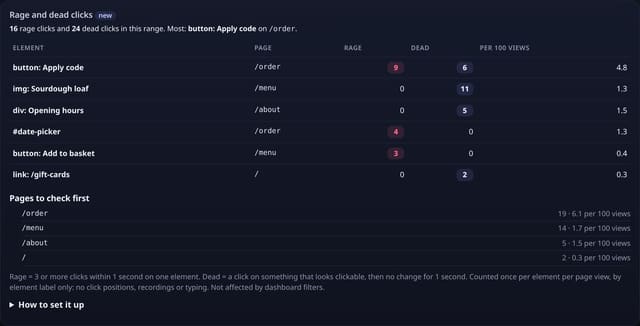
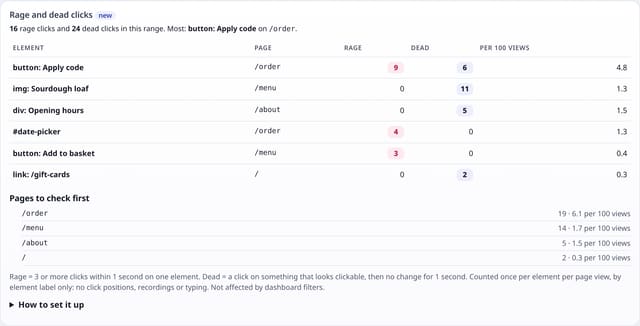
A Rage and dead clicks card on your dashboard: each element people rage-clicked or dead-clicked, the page it is on, how many times, and the rate per 100 page views of that page, plus the pages to check first.
Why it matters
Rage clicks and dead clicks point straight at broken or confusing parts of a page: a coupon button that does nothing, a product photo people expect to open, a date picker that does not respond. You find them without watching a single recording.
How it works
- Add the small frustration.js add-on next to your quietstats tag (it sends no pageviews).
- A rage click is 3 or more clicks within 1 second on the same element. A dead click is a click on something that looks clickable (a link, a button or anything with a pointer cursor) after which nothing changes for 1 second: same address, same page content, same focus.
- Each is sent once per element per page view, with a short label such as “button: Apply code”, “link: /pricing”, “img: Sourdough loaf” or the element’s id. At most 10 per page view.
- Clicks in form fields, links that open a new tab, downloads, email and phone links are never counted as dead.
Set it up
<script data-host="https://quietstats.co.uk" data-site="YOUR_SITE_ID" data-dnt="true" src="https://quietstats.co.uk/js/frustration.js" async defer></script>Replace YOUR_SITE_ID with the ID on your site’s settings page. Install guides →
Privacy: what is and isn’t collected
Collected
- Element label (id, or tag + its visible text, max 40 characters), page path, day
- Never what anyone types, mouse positions, scroll paths or recordings
Never collected
- Cookies, localStorage or anything else stored on the visitor’s device
- IP addresses or user agents (used in memory, then discarded)
- Anything that links a visitor across days (the visitor ID resets daily)
Rows and limits
- Optional add-on: script.js stays 845 bytes
- Pages that change something on every click (a ticking clock, a carousel) hide dead clicks rather than add false ones
- Quick legitimate clicks, such as tapping + three times on a quantity, can count as rage
- Not affected by dashboard filters
- Rows: at most 1 per element per page view that had a rage or dead click; 2 reads per dashboard view
“Rows” are database rows written, which is what our hosting is billed on. Reads are not rows written. Methodology →
Questions
Is this session replay?
No. Nothing is recorded. Only the element label, the page and the count are kept, and you see totals.
Will it slow my site?
It is a small separate file that loads after the page, listens for clicks and sends a message only when a rage or dead click happens.
Can I see these on quietstats.co.uk?
Yes. Our own site runs it, so the live demo shows real rage and dead clicks once they happen.
Related features
Try it on your own site
Free during launch: one site and 5,000 pageviews a month, no card needed. After launch, paid plans start at £5 a month.