Get set up and the sample playground
New accounts get a short Get set up checklist on the dashboard, and a sample playground so you can click every panel before your own visits arrive.
What it does
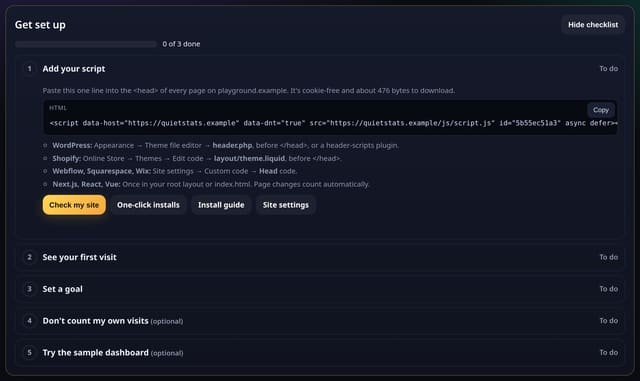
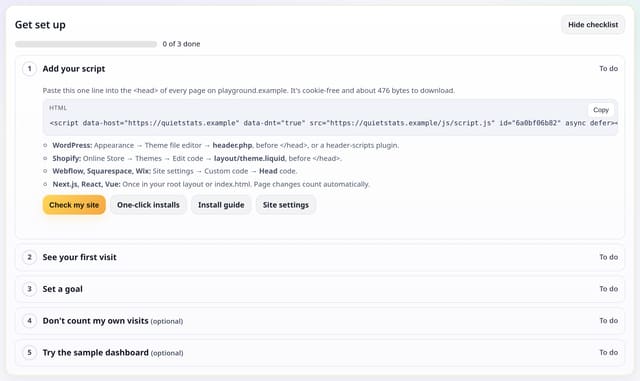
The Get set up card already ticks itself off as you add your script, see your first visit and set a goal, with an optional step to skip your own visits. It now also points you to the sample dashboard at /demo/sample — a playground of made-up numbers, clearly labelled, with every panel filled in. Hide checklist, the existing steps and the live demo of real stats are unchanged.
Why it matters
It is easier to learn the dashboard when you can click around a complete example, then go back to setting up your own site.
How to use it
- Add a site and open its dashboard. The Get set up card lists Add your script, See your first visit and Set a goal, plus the optional skip-my-visits step.
- Open Try the sample dashboard (or Sample dashboard in the public menu) to look around /demo/sample. It is made-up data, labelled at the top, and does not change your site.
- Hide the checklist whenever you like. The three required steps still tick themselves off from data you already have.
How it works
- After you add a site, the Get set up card appears at the top of the dashboard. Follow the steps; they tick themselves off from data already collected.
- Open Try the sample dashboard to visit the playground. It is made-up data, not your site, and is also linked from the public site as Sample dashboard.
- You can hide the checklist at any time. The sample playground stays at /demo/sample.
Privacy
- Collected: Nothing new: the checklist still uses install, visit and goal data you already have
- Collected: The playground uses made-up numbers only
- Not collected: Clicks around the playground
- Not collected: Anything about a person
- No cookies, and nothing stored on the visitor’s device.
- Reports show totals only: never a visitor list, IP address or single visit.
Limits
- The checklist shows for 30 days on a new account, until the three main steps are done or you hide it
- 1 write, only if you hide the checklist
- Core script.js is unchanged (845 B)
Plans
Every plan, including Free. quietstats is free during launch: the Free plan covers 1 site and 5,000 pageviews a month, and no card is needed. See pricing.
Questions
Is the sample dashboard my site?
No. It is made-up data so you can look around. Your site is unchanged. The live demo at /demo shows quietstats.co.uk’s real totals.
Did the Get set up steps change?
No. Add your script, see your first visit, set a goal and the optional skip-my-visits step are all still there, including Hide checklist.
Do I have to use the playground?
No. It is optional, on the checklist and in the public navigation.