Save the trend chart as an image
Save the trend chart you are looking at as a PNG or SVG image, ready for slides, a report or a post.
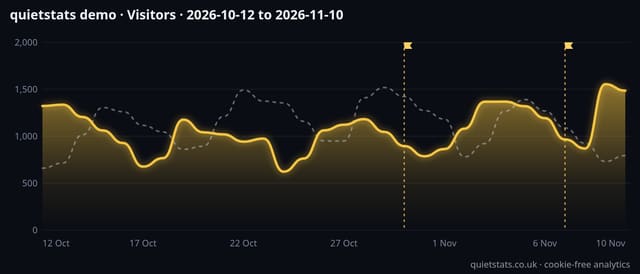
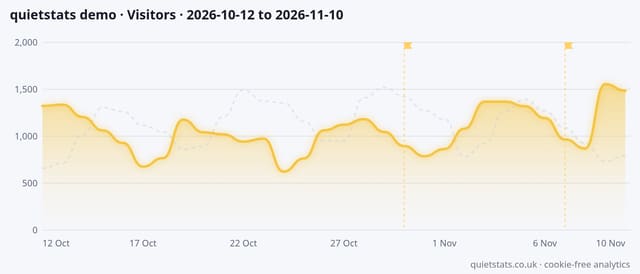
What it does
Two small buttons on the Trend card of your dashboard, the demo, public stats pages and report links. They save the chart that is on screen: the metric you picked, the dates, and the comparison line, notes, campaign and spike markers if they are showing, with a title (site, metric, dates) and a small quietstats.co.uk footer.
Why it matters
A chart in a deck or a client update says more than a table, and a screenshot of a whole page needs cropping. PNG drops straight into slides, email and chat; SVG stays sharp at any size and can be edited in design tools.
How to use it
- Open your dashboard, set the range and filters, and tap the headline card for the metric you want (visitors, pageviews and so on).
- On the Trend card, tap PNG for slides, email or chat, or SVG for a sharp, editable image.
- The file is saved to your downloads as quietstats-site-metric-dates. It uses your current theme, so switch theme first if you want the other look.
How it works
- Pick the date range, filters and metric you want on your dashboard.
- On the Trend card, tap PNG or SVG next to Save chart.
- Your browser builds the image from the chart already on the page, in your current theme (dark or light), and saves it as quietstats-site-metric-dates.png or .svg.
- Nothing is sent to quietstats or stored.
Privacy
- Collected: Nothing: the image is made from the chart already on your screen
- Collected: No image is stored or sent anywhere
- No cookies, and nothing stored on the visitor’s device.
- Reports show totals only: never a visitor list, IP address or single visit.
Limits
- 0 script bytes, 0 rows written or read
- Saves the Trend chart; for whole reports use Print or PDF
- PNG is twice the on-screen size so it stays crisp on slides
- Hover details are not part of the image
Plans
Every plan, including Free. quietstats is free during launch: the Free plan covers 1 site and 5,000 pageviews a month, and no card is needed. See pricing.
Questions
Light or dark?
The image uses the theme you have on screen. Switch theme first if you want the other one.
Can I edit the SVG?
Yes. It is a standalone SVG with the colours and fonts written in, so Figma, Illustrator, Inkscape or Keynote can open it.
Does it work on a phone?
Yes. The file goes to your downloads (on iPhone, the Files app).