Site folders
Group the sites in your account into folders, so Your sites and the site switcher stay easy to scan when you have more than a handful.
What it does
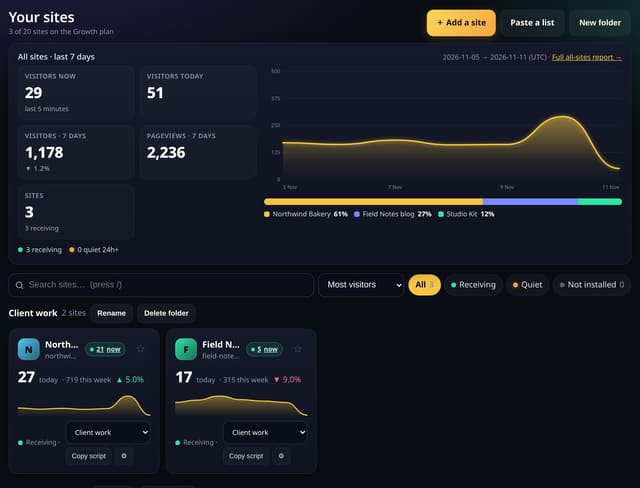
Add a folder on Your sites, give it a short name, and move sites into it from the card or from Manage. Folders appear as headed sections on Your sites and as headings in the site switcher. Add a site, Paste a list, pin, search, sort, Copy script and Check install all stay. Deleting a folder only ungroups its sites — it never deletes a site. This is separate from agency client folders.
Why it matters
A growing list of sites is easier to work with when client work, side projects and the rest each have their own group.
How to use it
- On Your sites, click New folder and type a short name. You can have up to 50 folders, 40 characters each.
- Move a site with the folder menu on its card, or open Manage and pick a folder under Details. Ungrouped is the default.
- The site switcher lists sites under their folder. All sites, the all-sites report, Add a site, pins and search stay as they are. Deleting a folder only ungroups its sites.
How it works
- On Your sites, click New folder and type a short name (up to 40 characters, up to 50 folders).
- Move a site with the folder menu on its card, or pick a folder under Details on Manage. Leave it as Ungrouped if you prefer.
- Open the site switcher: sites are listed under their folder, and All sites, the all-sites report, Add a site, pins and search are still there.
Privacy
- Collected: The folder name you type, and which of your sites sit in it
- Not collected: Anything about visitors
- Not collected: Agency client records — those stay on the agency tools
- No cookies, and nothing stored on the visitor’s device.
- Reports show totals only: never a visitor list, IP address or single visit.
Limits
- Up to 50 folders per account
- Names up to 40 characters
- 1 row per folder; moving a site is 1 update
- Every plan, including Free
- Core script.js is unchanged (845 B)
Plans
Every plan, including Free. quietstats is free during launch: the Free plan covers 1 site and 5,000 pageviews a month, and no card is needed. See pricing.
Questions
Is this the same as agency client folders?
No. Agency client folders (on the Business plan) group sites for a client report. Site folders are a simple grouping for any plan, only you see them.
What happens if I delete a folder?
The folder goes; its sites stay in your account, ungrouped. No pageviews are removed.
Can two people share a folder?
Folders belong to the account that created them. Team access to a site is unchanged.