Site folders
Group the sites in your account into folders, so Your sites and the site switcher stay easy to scan when you have more than a handful.
In every plan, including Free. See your traffic.
What it is
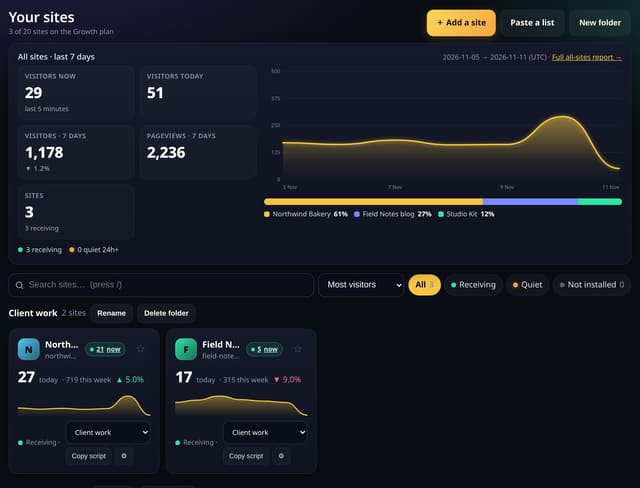
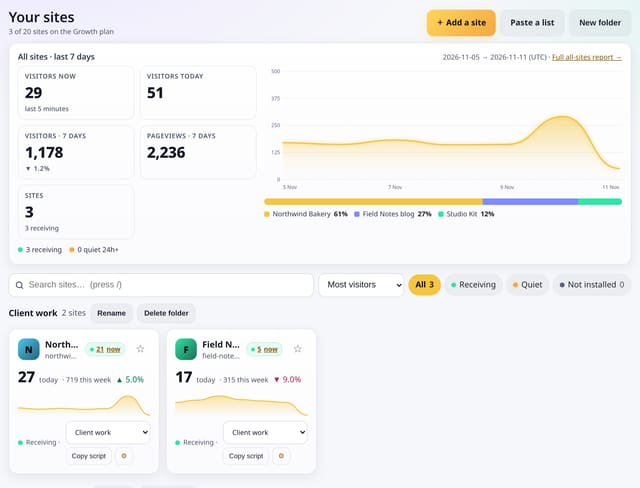
Add a folder on Your sites, give it a short name, and move sites into it from the card or from Manage. Folders appear as headed sections on Your sites and as headings in the site switcher. Add a site, Paste a list, pin, search, sort, Copy script and Check install all stay. Deleting a folder only ungroups its sites — it never deletes a site. This is separate from agency client folders.
Why it matters
A growing list of sites is easier to work with when client work, side projects and the rest each have their own group.
How it works
- On Your sites, click New folder and type a short name (up to 40 characters, up to 50 folders).
- Move a site with the folder menu on its card, or pick a folder under Details on Manage. Leave it as Ungrouped if you prefer.
- Open the site switcher: sites are listed under their folder, and All sites, the all-sites report, Add a site, pins and search are still there.
Privacy: what is and isn’t collected
Collected
- The folder name you type, and which of your sites sit in it
Never collected
- Anything about visitors
- Agency client records — those stay on the agency tools
- Cookies, localStorage or anything else stored on the visitor’s device
- IP addresses or user agents (used in memory, then discarded)
- Anything that links a visitor across days (the visitor ID resets daily)
Rows and limits
- Up to 50 folders per account
- Names up to 40 characters
- 1 row per folder; moving a site is 1 update
- Every plan, including Free
- Core script.js is unchanged (845 B)
“Rows” are database rows written, which is what our hosting is billed on. Reads are not rows written. Methodology →
Questions
Is this the same as agency client folders?
No. Agency client folders (on the Business plan) group sites for a client report. Site folders are a simple grouping for any plan, only you see them.
What happens if I delete a folder?
The folder goes; its sites stay in your account, ungrouped. No pageviews are removed.
Can two people share a folder?
Folders belong to the account that created them. Team access to a site is unchanged.
Related features
Set it up
Nothing to set up: it works with the standard one-line script.
<script data-host="https://quietstats.co.uk" data-dnt="true" src="https://quietstats.co.uk/js/script.js" id="YOUR_SITE_ID" async defer></script>Try it on your own site
Free during launch: one site and 5,000 pageviews a month, no card needed. After launch, paid plans start at £5 a month.