Form submission goals (no field data)
Turn a form being sent into a goal, with no field data: just the form’s name and that it was submitted.
In every plan, including Free. Goals, events and conversions.
What it is
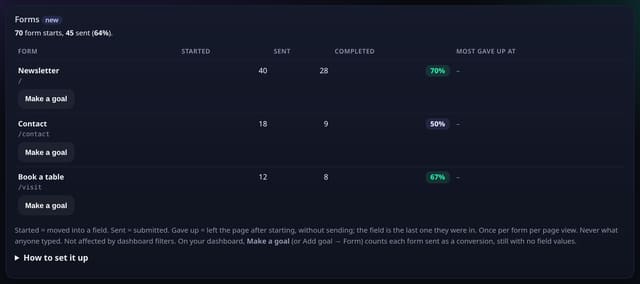
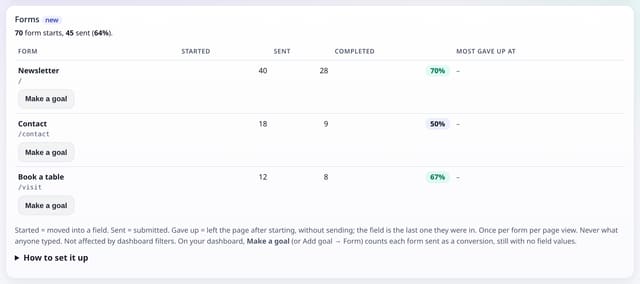
A Form goal on your dashboard counts unique visitors who submitted a named form (or any form). It uses the Form sent events from the optional forms.js add-on — the same events the Forms card already shows. You can add one from Add goal → Form, or tap Make a goal on a form in the Forms card.
Why it matters
A visit to a thank-you page is a useful proxy, but the form itself is the moment that mattered. This counts that moment without ever reading what anyone typed.
How it works
- Add forms.js next to your quietstats tag if it is not already there. Name a form with data-qs-form="Newsletter", or quietstats uses the form’s id, name or action.
- On your dashboard, Add goal → Form, and type the form name (or * for every form sent). Or open the Forms card and tap Make a goal next to a form.
- The goal counts unique visitors who sent that form in the range. It works in funnels with your other goals. Field names can still appear in drop-off; field values are never collected.
Privacy: what is and isn’t collected
Collected
- The form’s name (from data-qs-form, id, name or action) and that it was sent
- The page path
Never collected
- Anything typed into a field
- Field values, keystrokes or lengths
- Cookies, localStorage or anything else stored on the visitor’s device
- IP addresses or user agents (used in memory, then discarded)
- Anything that links a visitor across days (the visitor ID resets daily)
Rows and limits
- Needs the forms.js add-on (~1 KB, optional)
- 0 extra rows: it reads Form sent events you already collect
- Form names are cut to 40 characters
- Core script.js is unchanged (845 B)
“Rows” are database rows written, which is what our hosting is billed on. Reads are not rows written. Methodology →
Questions
Is this different from a page goal on /thank-you?
A page goal counts anyone who reached that path. A form goal counts the submit itself, even if they stay on the same page or the thank-you page has a different address.
Can I see what people typed?
No. quietstats never reads field values. The Forms card can show the field name where most people gave up, never what they entered.
Do I have to add a new script?
Only if you have not already added forms.js for form drop-off. The same add-on powers both.
Related features
Set it up
<script data-host="https://quietstats.co.uk" data-site="YOUR_SITE_ID" data-dnt="true" src="https://quietstats.co.uk/js/forms.js" async defer></script>Replace YOUR_SITE_ID with the ID on your site’s settings page. Install guides →
Try it on your own site
Free during launch: one site and 5,000 pageviews a month, no card needed. After launch, paid plans start at £5 a month.