Form starts and drop-off: where forms lose people
For each form: how many people started it, how many sent it, and the field where most people gave up.
In every plan, including Free. Behaviour and content.
What it is
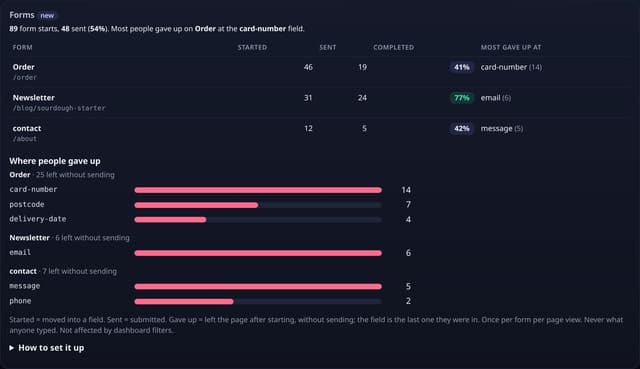
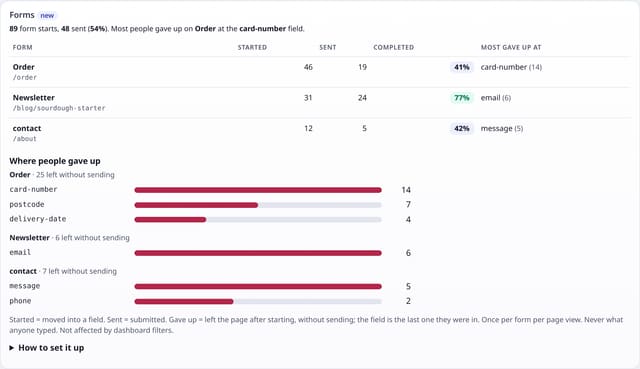
A Forms card on your dashboard: every form with its starts, sends and completion rate, the field where most people gave up, and for your leakiest forms a bar for each field people left on.
Why it matters
Sign-up, checkout and contact forms are where visitors turn into customers, and where many quietly leave. Knowing that 14 people gave up at the card number field tells you exactly what to fix.
How it works
- Add the small forms.js add-on next to your quietstats tag (it sends no pageviews).
- When someone first moves into a field of a form, that form counts as started. When the form is submitted, it counts as sent.
- If they leave the page after starting a form without sending it, it counts as given up, with the name of the last field they were in.
- Forms are named by data-qs-form, then their id, name, aria-label or the page they send to. Fields by their name or id. Each counts once per form per page view.
Set it up
<script data-host="https://quietstats.co.uk" data-site="YOUR_SITE_ID" data-dnt="true" src="https://quietstats.co.uk/js/forms.js" async defer></script>Replace YOUR_SITE_ID with the ID on your site’s settings page. Install guides →
Privacy: what is and isn’t collected
Collected
- Form name, field name (the last one before leaving), page path, day
- Never what anyone types: no values, keystrokes or lengths
Never collected
- Cookies, localStorage or anything else stored on the visitor’s device
- IP addresses or user agents (used in memory, then discarded)
- Anything that links a visitor across days (the visitor ID resets daily)
Rows and limits
- Optional add-on: script.js stays 845 bytes
- A form sent without moving into a field (one-click buttons) counts as sent but not started, so completion is capped at 100%
- Leaving is detected when the page is closed or changed; a tab left open counts later or not at all
- Not affected by dashboard filters
- Rows: up to 3 per form per page view where a form was used (started, sent or given up); 1 read per dashboard view
“Rows” are database rows written, which is what our hosting is billed on. Reads are not rows written. Methodology →
Questions
Can I use form sends as a goal?
Yes. Add an event goal for “Form sent” to count conversions and use it in funnels.
What about password fields?
Only the field’s name (for example “password”) can ever be recorded, as the last field someone was in. What they typed is never read.
Does it work with forms that send without reloading?
Yes. Starts and sends are counted the same way, and single-page app navigation counts as leaving the page.
Related features
Try it on your own site
Free during launch: one site and 5,000 pageviews a month, no card needed. After launch, paid plans start at £5 a month.