Print and PDF reports
Turn any dashboard view into a clean A4 report you can print or save as a PDF, in one tap.
In every plan, including Free. Reports, sharing and alerts.
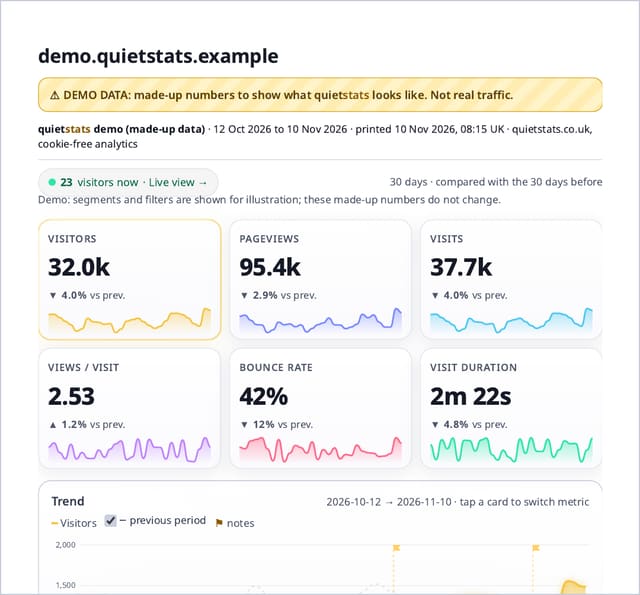
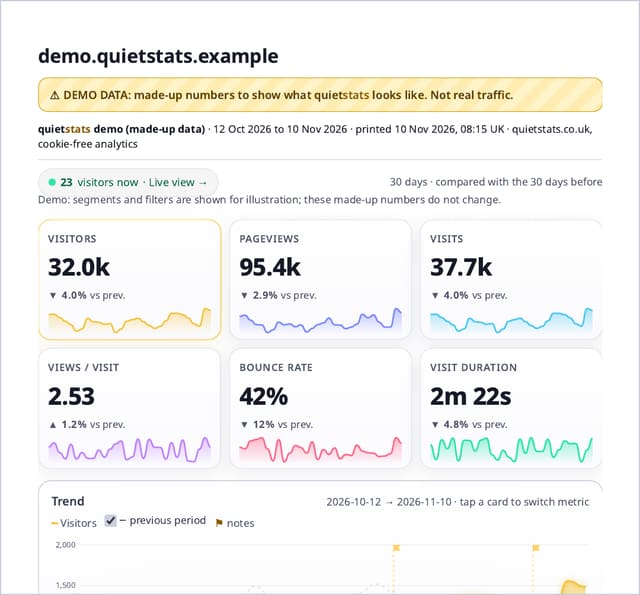
What it is
A Print or PDF button at the top of your dashboard, the demo, public stats pages and report links, and a print layout: A4 pages in light colours whatever theme you use on screen, a header with the site, the dates and when it was printed, and no menus, filters, buttons or set-up boxes.
Why it matters
Plenty of people still want numbers on paper or as a PDF: for a monthly meeting, a client, a board pack or your own records. Screenshots of a dark dashboard print badly; this prints exactly what you are looking at, cleanly.
How it works
- Pick the range and any filters you want on your dashboard, then tap Print or PDF (or press Ctrl+P or Cmd+P).
- quietstats switches the page to light colours for printing, hides navigation and controls, keeps each card whole on a page and adds a header with the site, dates and print time (UK time).
- Choose your printer, or Save as PDF in the print dialog. Your screen goes back to your own theme afterwards.
- The PDF is made by your browser on your device. Nothing is sent to quietstats or stored.
Privacy: what is and isn’t collected
Collected
- Nothing: printing uses the numbers already on your screen
- No PDF is stored or sent anywhere
Never collected
- Cookies, localStorage or anything else stored on the visitor’s device
- IP addresses or user agents (used in memory, then discarded)
- Anything that links a visitor across days (the visitor ID resets daily)
Rows and limits
- 0 script bytes, 0 rows written or read
- The report shows what is open on screen: expanded lists print expanded
- Interactive parts (live counter, hover details) print as they are at that moment
- For a report someone else can open, use report links
“Rows” are database rows written, which is what our hosting is billed on. Reads are not rows written. Methodology →
Questions
Can I schedule a PDF to be emailed?
Not yet. Emails are switched off for now. Print or save a PDF when you need one, or share a report link.
Does it print in dark mode?
No. It always prints in light colours so text stays readable and you do not use a cartridge of black ink, then puts your theme back.
Does it work on a phone?
Yes. Tap Print or PDF and use the share or print sheet; on iPhone choose Print, then pinch out on the preview to get a PDF to save or share.
Related features
Set it up
Nothing to set up: it works with the standard one-line script.
<script data-host="https://quietstats.co.uk" data-dnt="true" src="https://quietstats.co.uk/js/script.js" id="YOUR_SITE_ID" async defer></script>Try it on your own site
Free during launch: one site and 5,000 pageviews a month, no card needed. After launch, paid plans start at £5 a month.