Seen on screen: did people even see it?
Mark your pricing table, sign-up box or call to action and see what share of page views actually got that far.
In every plan, including Free. Behaviour and content.
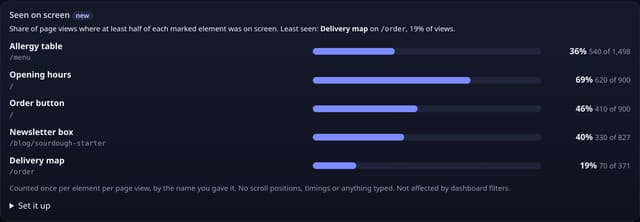
What it is
A Seen on screen card on your dashboard: for each element you marked, on each page, how many page views saw it and what share of that page’s views that is, with the least-seen element called out.
Why it matters
A sign-up box nobody clicks might be badly worded, or nobody might scroll that far. Knowing that only 30% of visitors ever see your pricing table tells you to move it up before you rewrite it.
How it works
- Add the small seen.js add-on next to your quietstats tag (it sends no pageviews).
- Give each element you care about a name: data-qs-view="Pricing table" on the section, box or button.
- When at least half of a marked element is on screen (or it fills half the screen, for tall sections), the add-on sends its name once for that page view. At most 20 names per page view.
- quietstats divides the times each element was seen by the page views of its page, so you get a seen rate per element and page.
Privacy: what is and isn’t collected
Collected
- The name you gave the element (max 60 characters), page path and day
- Never scroll positions, how long something was on screen, what anyone types, or anything about the visitor
Never collected
- Cookies, localStorage or anything else stored on the visitor’s device
- IP addresses or user agents (used in memory, then discarded)
- Anything that links a visitor across days (the visitor ID resets daily)
Rows and limits
- Optional add-on: script.js stays 845 bytes
- Only elements you mark are counted
- Seen means half on screen once; it does not mean read
- Not affected by dashboard filters
- Rows: 1 written per marked element seen per page view (20 at most); 2 reads per dashboard view
“Rows” are database rows written, which is what our hosting is billed on. Reads are not rows written. Methodology →
Questions
Is this a scroll map or heatmap?
No. Nothing about scrolling is recorded. You only learn whether each element you named was seen in a page view, as a total.
Does it work on single-page apps?
Yes. Elements added later are picked up, and a route change through the history API starts a new page view, so each element can count again.
How is this different from scroll depth?
Scroll depth tells you how far down the page people went in general. Seen on screen tells you about the specific things you care about, wherever they sit on the page.
Related features
Set it up
<script data-host="https://quietstats.co.uk" data-site="YOUR_SITE_ID" data-dnt="true" src="https://quietstats.co.uk/js/seen.js" async defer></script>
<section data-qs-view="Pricing table">…</section>
Replace YOUR_SITE_ID with the ID on your site’s settings page. Install guides →
Try it on your own site
Free during launch: one site and 5,000 pageviews a month, no card needed. After launch, paid plans start at £5 a month.