Custom events and conversion rates
Count sign-ups, button clicks or anything else with qs('Signup') or a data-qs-event attribute.
What it does
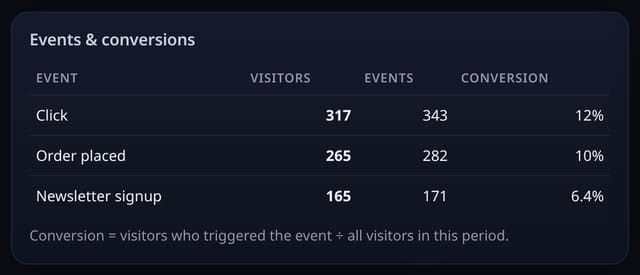
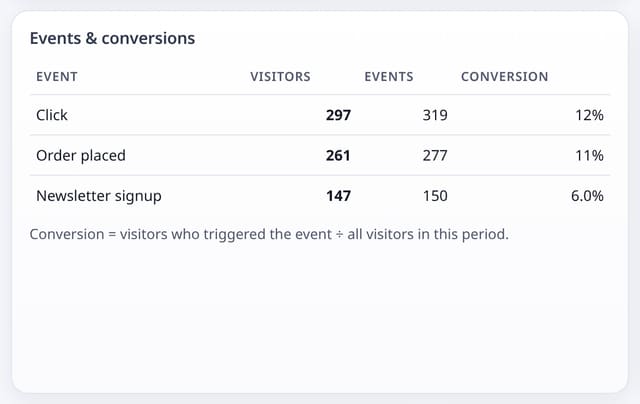
Events with visitors, counts and conversion rate on your dashboard, with an optional property such as the plan name.
Why it matters
Pageviews can’t see a form being sent or a video being played. Events can.
How to use it
- Swap /js/script.js for /js/events.js (it counts pageviews too).
- Call qs('Signup') in your code, or add data-qs-event="Signup" to a link or button.
- Add data-qs-prop for one short property, such as the plan.
- Make the event a goal in 🎯 Goals to see its conversion rate.
HTML
<script data-host="https://quietstats.co.uk" data-dnt="true"  src="https://quietstats.co.uk/js/events.js" id="YOUR_SITE_ID" async defer></script>
<button data-qs-event="Signup" data-qs-prop="pricing">Start free</button>
Replace YOUR_SITE_ID with the ID shown on your site’s Manage page.
How it works
- Use the optional events script instead of the standard one.
- Call qs('Signup') in your code, or add data-qs-event="Signup" to a link or button.
- Add data-qs-prop for one short property, such as the plan.
Privacy
- Collected: Event name and one optional short property
- Not collected: Form contents or anything typed
- No cookies, and nothing stored on the visitor’s device.
- Reports show totals only: never a visitor list, IP address or single visit.
Limits
- Rows: about 2 per event
- Events count towards your monthly pageviews
Plans
Every plan, including Free. quietstats is free during launch: the Free plan covers 1 site and 5,000 pageviews a month, and no card is needed. See pricing.
Questions
Do I lose anything by switching scripts?
No. events.js does everything script.js does, plus events. It is 2,344 bytes uncompressed; script.js is about 476 bytes to download (845 bytes uncompressed).