AI crawler report: which AI bots read your pages
See which AI and search crawlers (GPTBot, ClaudeBot, PerplexityBot, Googlebot and others) read your pages, and how often.
In every plan, including Free. Sources and campaigns.
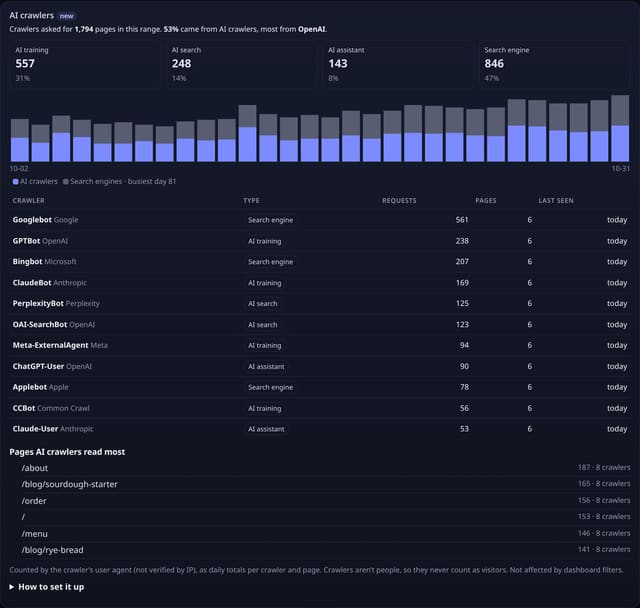
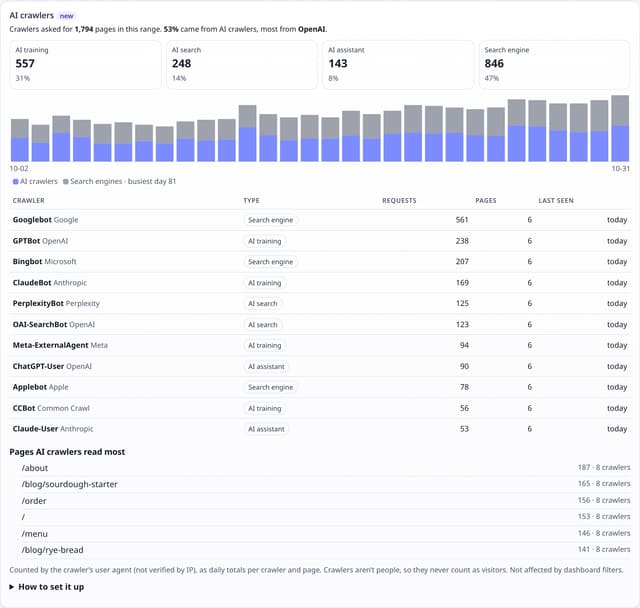
What it is
An AI crawlers card on your dashboard: requests from each crawler and who runs it, split into AI training, AI search, AI assistant and search engine crawlers, a day-by-day chart of AI against search engine requests, the pages AI crawlers read most, and when each crawler was last seen.
Why it matters
AI assistants can only cite and recommend pages they have read. This shows whether ChatGPT, Claude, Perplexity and the rest can see your content long before they send you a single visitor, and whether a robots.txt change actually took effect.
How it works
- Crawlers don’t run JavaScript, so your quietstats tag can’t see them. You add a few lines to your server instead: a Cloudflare Worker, Express or Node middleware, or a WordPress hook (the dashboard shows each one with your site ID filled in).
- For requests whose user agent names a known crawler, the hook sends quietstats the page address and the user agent. Requests from people send nothing.
- quietstats keeps a daily total per crawler and page. The query string is dropped, and the user agent is only used to pick the crawler’s name.
- quietstats.co.uk counts crawlers on its own pages the same way, which is what you see on the live demo.
Set it up
curl -X POST "https://quietstats.co.uk/api/crawl" -H "content-type: application/json" -d '{"s":"YOUR_SITE_ID","u":"https://example.com/","ua":"GPTBot/1.2"}'Replace YOUR_SITE_ID with the ID on your site’s settings page. Install guides →
Privacy: what is and isn’t collected
Collected
- Crawler name (from its user agent), page path and day
- Nothing about people: no IP address, no visitor hash, no cookies
Never collected
- Cookies, localStorage or anything else stored on the visitor’s device
- IP addresses or user agents (used in memory, then discarded)
- Anything that links a visitor across days (the visitor ID resets daily)
Rows and limits
- Needs a small server-side hook (0 bytes added to the tracking script)
- Crawlers are identified by user agent, not verified by IP address
- Not affected by dashboard filters
- Rows: 1 written per crawler request your hook reports; 3 reads per dashboard view
“Rows” are database rows written, which is what our hosting is billed on. Reads are not rows written. Methodology →
Questions
Do crawlers count as visitors?
No. Crawlers are not people, so they are never counted as visitors or pageviews. They only appear in the AI crawlers card.
My site is busy. Will this add up?
Send 1 in 10 crawler requests with w: 10 in the body and each one counts as 10. Totals stay close and the hook does a tenth of the work.
Can someone fake crawler visits?
Anyone who knows your site ID could send made-up totals, just as with pageviews. The URL must be on your own domain and only known crawler names are accepted.
Related features
Try it on your own site
Free during launch: one site and 5,000 pageviews a month, no card needed. After launch, paid plans start at £5 a month.