Campaign cost and return on ad spend: was that ad worth it?
Add what each campaign cost, by hand or as a CSV, and see cost per visitor, cost per goal and return on ad spend.
In every plan, including Free. Sources and campaigns.
What it is
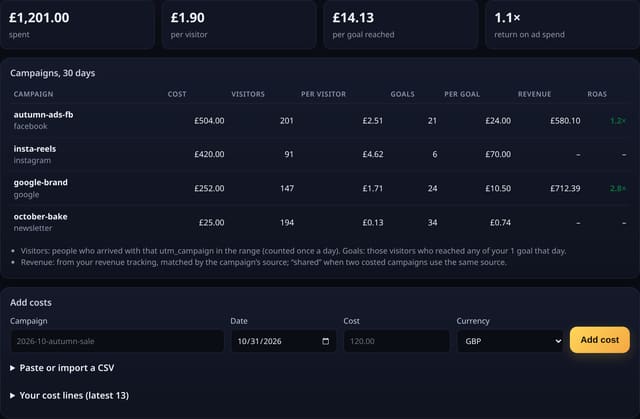
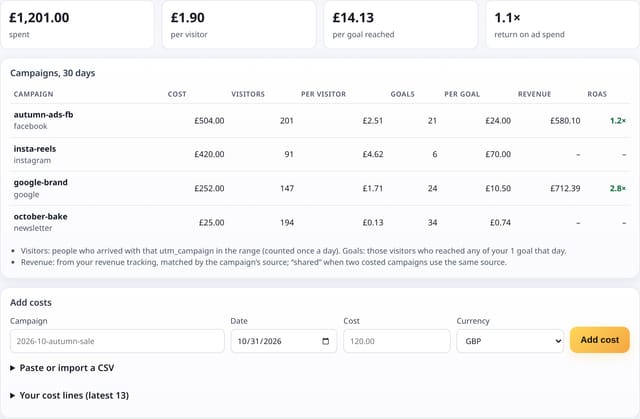
A Campaign cost and return page for each site: total spend, cost per visitor, cost per goal reached and return on ad spend for the range, then a row per campaign with its cost, visitors, goals, revenue and ROAS. Campaigns with a cost but no visits are flagged so you can check the link tags.
Why it matters
Visitor numbers alone don’t say whether an ad paid off. Putting what you spent next to the visitors, goals and revenue each campaign brought answers “was that ad worth it?” in pounds, for Facebook, Google, Instagram, newsletters or a printed flyer.
How it works
- Tag your ad links with utm_campaign (the Campaigns page builds tagged links for you).
- On Campaign cost and return, add what a campaign cost on a day, or paste a CSV of campaign, date and cost lines exported from your ad platform. A line for the same campaign and date replaces the old one, so importing a file twice never double-counts.
- quietstats adds up the cost in the range and matches it with the visitors who arrived with that utm_campaign, the ones who reached any of your goals that day and, if revenue tracking is on, the revenue from the campaign’s source.
- Cost per visitor = cost ÷ visitors. Cost per goal = cost ÷ visitors who reached a goal. Return on ad spend = revenue ÷ cost.
Set it up
Nothing to set up: it works with the standard one-line script.
<script data-host="https://quietstats.co.uk" data-dnt="true" src="https://quietstats.co.uk/js/script.js" id="YOUR_SITE_ID" async defer></script>Privacy: what is and isn’t collected
Collected
- Your own spend: campaign name, date, amount and currency
- Nothing new about visitors: matched by utm_campaign totals only
Never collected
- Cookies, localStorage or anything else stored on the visitor’s device
- IP addresses or user agents (used in memory, then discarded)
- Anything that links a visitor across days (the visitor ID resets daily)
Rows and limits
- Revenue is matched by the campaign’s source (for example facebook.com); when two costed campaigns share a source, their revenue shows as “shared” instead of being guessed
- One currency per report: the one most of your spend is in
- Goals count visitors who reached a goal on the same day
- Up to 400 lines per import and 5,000 per site
- Rows: 1 per cost line you save (writes only when you save); 3 reads per page view
“Rows” are database rows written, which is what our hosting is billed on. Reads are not rows written. Methodology →
Questions
Can I import from Google Ads or Meta?
Yes. Export the campaign report with campaign name, day and cost, keep those three columns and paste them in. Use the same name as your utm_campaign tag.
Is my spend shared with anyone?
No. Cost lines are private to your account, are never shown on public dashboards or share links, and are deleted with the site.
What if I only know the monthly total?
Add one line on the first day of the month. Pick a range that covers the whole month to see the full cost.
Related features
Try it on your own site
Free during launch: one site and 5,000 pageviews a month, no card needed. After launch, paid plans start at £5 a month.