Keyboard shortcuts
Move around your dashboard without the mouse: press ? to see every shortcut.
In every plan, including Free. See your traffic.
What it is
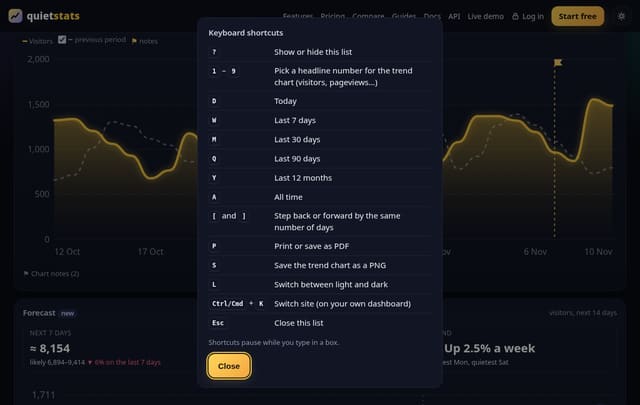
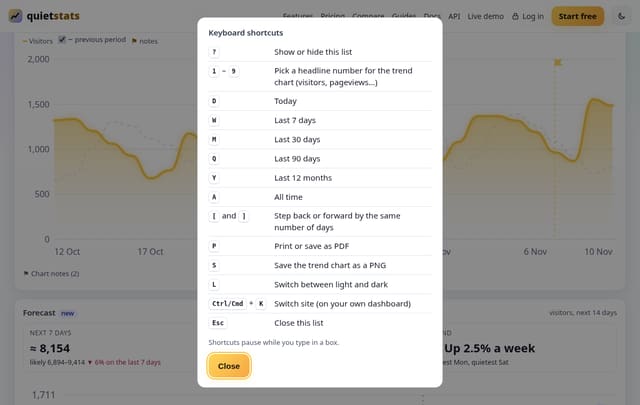
Shortcuts on your dashboard, the demo, public stats pages and report links. Number keys pick the headline number for the trend chart, letters pick the date range (D today, W 7 days, M 30 days, Q 90 days, Y 12 months, A all time), [ and ] step back and forward, P prints, S saves the chart, L switches theme. Ctrl or Cmd + K still opens the site switcher.
Why it matters
If you check your numbers every day, a couple of key presses beats hunting for buttons. It also helps anyone who finds a mouse or trackpad hard work.
How it works
- Press ? (or tap the ⌨ button next to Print or PDF) to see the list.
- Press a key: the dashboard does exactly what the matching button would do.
- Shortcuts pause while you type in a box, and anything with Ctrl, Cmd or Alt is left to your browser.
- Press Esc or ? to close the list.
Privacy: what is and isn’t collected
Collected
- Nothing: shortcuts run in your browser and press the same buttons you would
Never collected
- Cookies, localStorage or anything else stored on the visitor’s device
- IP addresses or user agents (used in memory, then discarded)
- Anything that links a visitor across days (the visitor ID resets daily)
Rows and limits
- 0 script bytes, 0 rows written or read
- Needs a keyboard; the ⌨ button is hidden on touch screens
- Letter keys follow the English names (D for day, W for week…)
“Rows” are database rows written, which is what our hosting is billed on. Reads are not rows written. Methodology →
Questions
Can I change the keys?
Not yet. Tell us if a key clashes with something you use.
Do they work with a screen reader?
Yes. Each key presses an ordinary link or button, and the list is a normal dialog with a table. Screen reader browse modes may catch letter keys first; switch to focus mode to use them.
Related features
Set it up
Nothing to set up: it works with the standard one-line script.
<script data-host="https://quietstats.co.uk" data-dnt="true" src="https://quietstats.co.uk/js/script.js" id="YOUR_SITE_ID" async defer></script>Try it on your own site
Free during launch: one site and 5,000 pageviews a month, no card needed. After launch, paid plans start at £5 a month.