Landing page scorecards: an A to F grade for every landing page
A simple A to F grade for every page people land on, from bounce rate, engaged time, scroll depth and goal rate.
In every plan, including Free. Behaviour and content.
What it is
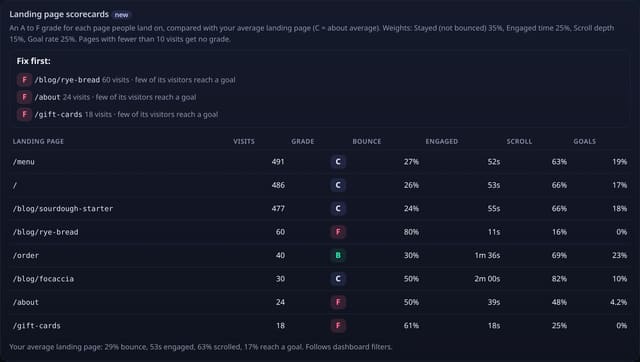
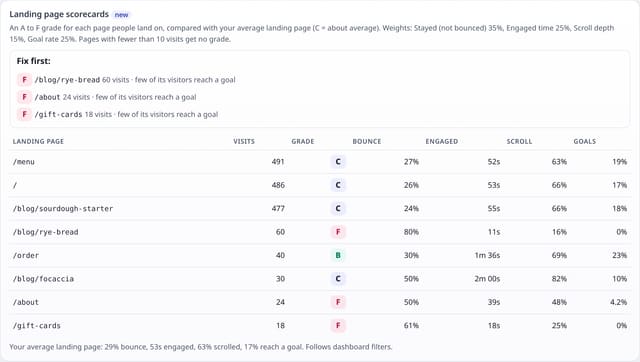
A Landing page scorecards card on your dashboard: each page that starts visits, with its visits, a grade, bounce rate, engaged time, scroll depth and goal rate, plus a short “Fix first” list of your busiest D and F pages and the reason each one scored low.
Why it matters
Bounce rate, engaged time, scroll depth and conversions live in different reports. A single grade per landing page tells you which page to fix first, and the reason tells you what to fix, without reading five reports.
How it works
- Each visit counts for its first page (a new visit starts after 30 minutes without a page).
- For each landing page, quietstats compares four things with your average landing page: how many visits stayed past the first page, engaged time and scroll depth on that page, and how many of its visitors reached a goal that day.
- Each part scores 50 at your site’s average and 100 at twice as good (capped). The grade is the weighted average: staying 35%, engaged time 25%, scroll depth 15%, goal rate 25%. Parts your site doesn’t measure drop out and the rest are reweighted.
- A is 70 or more, B 58+, C 45+ (about average), D 33+, F below. Pages with fewer than 10 visits get no grade.
Set it up
Nothing to set up: it works with the standard one-line script.
<script data-host="https://quietstats.co.uk" data-dnt="true" src="https://quietstats.co.uk/js/script.js" id="YOUR_SITE_ID" async defer></script>Privacy: what is and isn’t collected
Collected
- Nothing new: pageviews, the engaged time and scroll depth the data-engage add-on already records, and your goals
Never collected
- Cookies, localStorage or anything else stored on the visitor’s device
- IP addresses or user agents (used in memory, then discarded)
- Anything that links a visitor across days (the visitor ID resets daily)
Rows and limits
- Grades are relative to your own site, so a C is “about average for this site”, not a universal score
- Engaged time and scroll depth count only when the data-engage add-on runs on at least 20% of landing visits
- Goal rate counts only when you have goals and at least one conversion in the range
- Top 12 landing pages by visits
- Rows: 0 writes; 1 read over the range’s pageviews plus 1 for your goal list
“Rows” are database rows written, which is what our hosting is billed on. Reads are not rows written. Methodology →
Questions
Why is my home page only a C?
C means about average for your site. Home pages are often your biggest landing page, so they pull the average towards themselves.
Do dashboard filters change the grades?
Yes. Filter by a source, country or device and every page is graded against the average for that filter.
Does this add anything to my tracking script?
No. It is worked out from data you already have; script.js stays 845 bytes.
Related features
Try it on your own site
Free during launch: one site and 5,000 pageviews a month, no card needed. After launch, paid plans start at £5 a month.