QR codes for posters and print: see what each one brings
Make a QR code for a flyer, poster or menu and see how many visits each one brings.
In every plan, including Free. Goals, events and conversions.
What it is
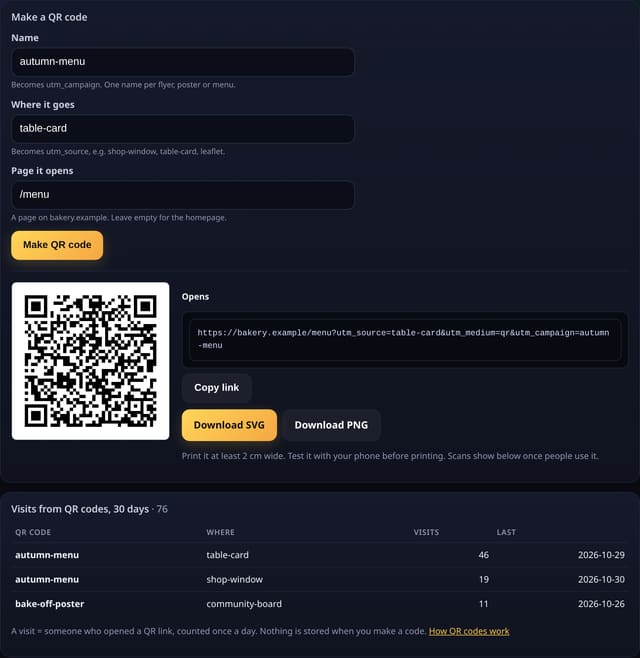
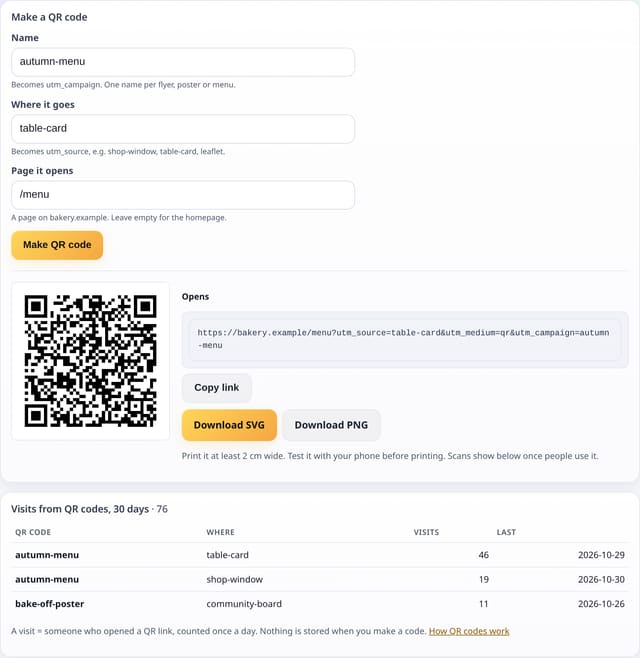
A QR codes page for each site: give the code a name, say where it goes and which page it opens, then download it as SVG or PNG. Below, a table shows the visits each printed code has brought.
Why it matters
Print is hard to measure. A separate code for the shop window, the table cards and the leaflet tells you which one people actually scan, so you know where to spend next time.
How it works
- Open QR codes from your dashboard (UTM campaigns card) and fill in a name, where it goes and the page it opens.
- quietstats builds a normal link to your page with utm_source (where it goes), utm_medium=qr and utm_campaign (the name), and draws it as a QR code.
- Download it as SVG for print or PNG for anything else. Nothing is saved when you make a code.
- When someone scans it, their visit is counted like any other, cookie-free. The table groups visits with utm_medium=qr by name and place.
Set it up
Nothing to set up: it works with the standard one-line script.
<script data-host="https://quietstats.co.uk" data-dnt="true" src="https://quietstats.co.uk/js/script.js" id="YOUR_SITE_ID" async defer></script>Privacy: what is and isn’t collected
Collected
- Nothing new: the code is a tagged link, and visits are counted like any other
- Name and place come from the link, not from the person scanning
Never collected
- Cookies, localStorage or anything else stored on the visitor’s device
- IP addresses or user agents (used in memory, then discarded)
- Anything that links a visitor across days (the visitor ID resets daily)
Rows and limits
- 0 script bytes, 0 rows written when a code is made
- A visit is counted once a day per visitor
- Codes must open a page on the site itself, so the visits count for it
- Rows: 1 read per page view over the range’s QR visits
“Rows” are database rows written, which is what our hosting is billed on. Reads are not rows written. Methodology →
Questions
Do QR codes expire?
No. They are plain links to your own page, so they keep working for as long as the page exists, even if you stop using quietstats.
Can I change where a printed code goes?
No, the page is part of the link. Redirect the old page on your site if you need to.
Why not a short link?
A short link needs a redirect service that sees every scan. A direct link to your page counts the visit the same cookie-free way, with nothing in between.
Related features
Try it on your own site
Free during launch: one site and 5,000 pageviews a month, no card needed. After launch, paid plans start at £5 a month.