Search keywords from Google Search Console
See the search terms that bring people to each page from Google, next to your quietstats numbers.
In every plan, including Free. Sources and campaigns.
What it is
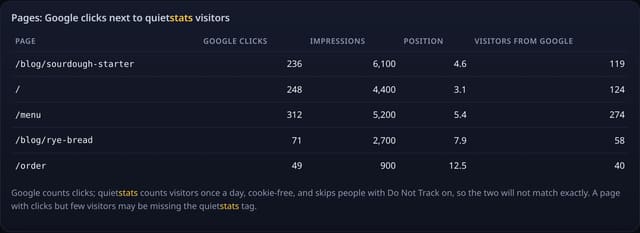
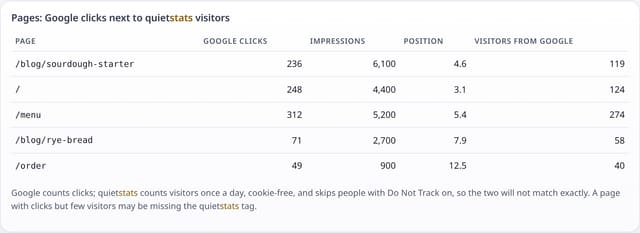
A Search keywords page for each site and a card on your dashboard: Google clicks, impressions, click-through rate and average position, your top search terms with a search box, an “Almost on page 1” list, and each page’s Google clicks next to the visitors quietstats counted from Google over the same dates.
Why it matters
The one thing a cookie-free tool cannot see on its own is what people typed into Google. Search Console knows, quietstats knows what they did next. Side by side you can see which searches bring readers, which pages Google shows but nobody clicks, and which terms are one push away from page 1.
How it works
- In Search Console open Performance, pick your dates, tap Export and choose Download CSV. Google gives you a .zip.
- Upload that .zip on your site’s Search keywords page (dashboard → UTM campaigns card → Search keywords). No Google sign-in or password is shared with quietstats.
- quietstats reads the export’s Queries, Pages and Dates files and keeps the top 500 search terms and pages with their clicks, impressions, CTR and position, plus the date range.
- For each page it counts the visitors quietstats saw arrive from Google over the same dates, so you can compare the two. A new upload replaces the last one.
Privacy: what is and isn’t collected
Collected
- The totals Google already reports in your export: search term or page, clicks, impressions, CTR and position, and the date range
- Nothing about a visitor: Google leaves out rare searches, and quietstats adds no tracking
Never collected
- Cookies, localStorage or anything else stored on the visitor’s device
- IP addresses or user agents (used in memory, then discarded)
- Anything that links a visitor across days (the visitor ID resets daily)
Rows and limits
- 0 script bytes; works from your own Search Console export
- Top 500 search terms and 500 pages per upload, up to 3 MB; one upload per site is kept
- Search terms are not split per page (Search Console’s export does not pair them); pages from other domains in the export are left out
- A direct Search Console connection that refreshes by itself is not available yet
- Rows: 1 written per upload; 2 reads per Search keywords page view and 1 per dashboard view
“Rows” are database rows written, which is what our hosting is billed on. Reads are not rows written. Methodology →
Questions
Do I have to give quietstats my Google login?
No. You download the export from Search Console yourself and upload the file. quietstats never signs in to Google.
Why don’t Google clicks match quietstats visitors?
Google counts every click on a result. quietstats counts each visitor once a day, cookie-free, and skips people with Do Not Track or Global Privacy Control on. Some browsers also hide that a visit came from Google. A big gap on one page can also mean the tag is missing there.
How often should I upload?
Whenever you want fresh numbers. Monthly works well: export Last 28 days or Last 3 months and upload it. The newest upload replaces the old one.
Can I remove it?
Yes. Remove Search Console data on the Search keywords page deletes it straight away, and deleting the site or your account deletes it too.
Related features
Set it up
Nothing to set up: it works with the standard one-line script.
<script data-host="https://quietstats.co.uk" data-dnt="true" src="https://quietstats.co.uk/js/script.js" id="YOUR_SITE_ID" async defer></script>Try it on your own site
Free during launch: one site and 5,000 pageviews a month, no card needed. After launch, paid plans start at £5 a month.