Shop orders by source: WooCommerce and Shopify
Connect WooCommerce or Shopify to see orders and revenue by traffic source, alongside Stripe.
In every plan, including Free. Goals, events and conversions.
What it is
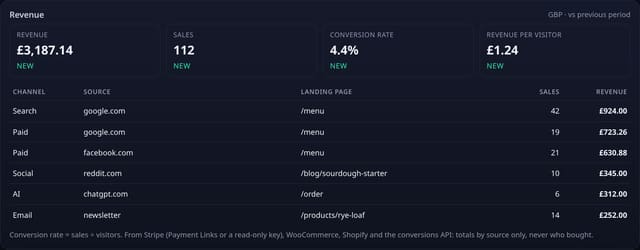
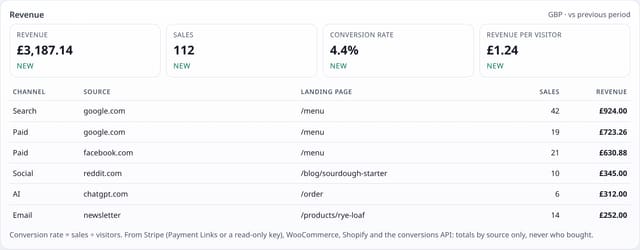
Your shop sends each paid order to quietstats by webhook. The Revenue card and revenue by source then show shop orders next to Stripe sales: sales, revenue, conversion rate and revenue per visitor, split by channel, source and landing page.
Why it matters
Visitors are only half the story for a shop. Knowing that Reddit sent 40 visitors is useful; knowing it sent £140 of orders is what decides where you spend your time.
How it works
- In Manage site → Revenue by source → WooCommerce or Shopify, copy your webhook address.
- Add it in your shop as a webhook (WooCommerce: Order updated; Shopify: Order payment) and paste the webhook secret into quietstats. It is stored encrypted.
- Each webhook is checked against that secret. Only paid orders count, and each order counts once however often the shop resends it.
- quietstats reads the order total, currency, date and the shop’s own attribution (referring site, utm source and medium, first page), then adds it to that day’s totals by source.
Set it up
Nothing to set up: it works with the standard one-line script.
<script data-host="https://quietstats.co.uk" data-dnt="true" src="https://quietstats.co.uk/js/script.js" id="YOUR_SITE_ID" async defer></script>Privacy: what is and isn’t collected
Collected
- Order totals by day, channel, source and landing page
- Never the customer: no names, emails, addresses or order contents
- The order number only as a one-way hash for 35 days, to stop double counting
Never collected
- Cookies, localStorage or anything else stored on the visitor’s device
- IP addresses or user agents (used in memory, then discarded)
- Anything that links a visitor across days (the visitor ID resets daily)
Rows and limits
- 0 script bytes: it works from the shop’s own order attribution
- WooCommerce needs order attribution on (WooCommerce 8.5 or later, on by default)
- Refunds are not subtracted yet; Shopify test orders are left out
- Rows: 2 written per new paid order, 0 for a repeat
“Rows” are database rows written, which is what our hosting is billed on. Reads are not rows written. Methodology →
Questions
Does it need a plugin?
No. Both shops can send webhooks from their admin. WooCommerce records where each order came from itself; Shopify sends the referring site and landing page with the order.
Is any customer data sent to quietstats?
The shop sends its normal order data, but quietstats reads only the total, currency, date, paid status and where the order came from. Nothing about the customer is read or stored.
Can I use it with Stripe too?
Yes. Shop orders and Stripe sales add up on the same Revenue card, each counted once.
Related features
Try it on your own site
Free during launch: one site and 5,000 pageviews a month, no card needed. After launch, paid plans start at £5 a month.