Visit depth: how many pages each visit sees
How many visits see 1 page, 2 pages, 3 to 5 pages or more, as a simple chart on your dashboard.
In every plan, including Free. See your traffic.
What it is
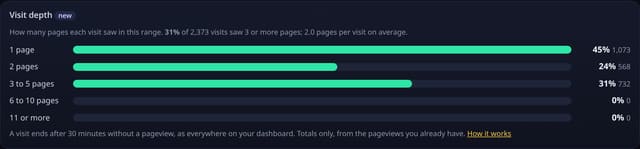
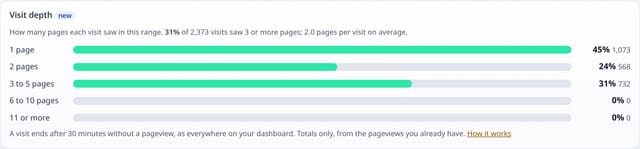
A Visit depth card on your dashboard: the share of visits that saw 1 page, 2 pages, 3 to 5, 6 to 10 and 11 or more, with the share that saw 3 or more and the average.
Why it matters
An average of 2.1 pages per visit can hide a site where most people read one page and a few read twenty. The spread shows whether people explore or leave, and whether a change to your menus or links moved it.
How it works
- When you open the dashboard, quietstats groups the pageviews in the range into visits, using the same rule as everywhere else: a new visit starts after 30 minutes without a pageview.
- It counts the pages in each visit and adds the visit to one of five buckets.
- Only the five bucket totals leave the database, never a visit or a visitor.
- Filters and segments apply, so you can compare the spread for one source, country or page.
Set it up
Nothing to set up: it works with the standard one-line script.
<script data-host="https://quietstats.co.uk" data-dnt="true" src="https://quietstats.co.uk/js/script.js" id="YOUR_SITE_ID" async defer></script>Privacy: what is and isn’t collected
Collected
- Nothing new: it reads the pageviews you already have
- Only five totals, never a visit or a visitor
Never collected
- Cookies, localStorage or anything else stored on the visitor’s device
- IP addresses or user agents (used in memory, then discarded)
- Anything that links a visitor across days (the visitor ID resets daily)
Rows and limits
- 0 script bytes, 0 rows written
- Rows: 1 read of the range’s pageviews per dashboard view (the same rows the visit totals use)
- Imported history without pageview detail is not split into buckets
“Rows” are database rows written, which is what our hosting is billed on. Reads are not rows written. Methodology →
Questions
Why do most visits see one page?
That is normal for blogs and pages found from search: people get their answer and go. Compare the spread for different sources with a filter to see which bring explorers.
Is this the same as bounce rate?
The 1 page bar is your bounce rate. The other bars show what the rest did.
Does it track how people move around?
No. It only counts pages per visit. The order of pages is not used.
Related features
Try it on your own site
Free during launch: one site and 5,000 pageviews a month, no card needed. After launch, paid plans start at £5 a month.