Author and category reports
See traffic and engagement for each author, category and tag, read from the labels your pages already have.
In every plan, including Free. See your traffic.
What it is
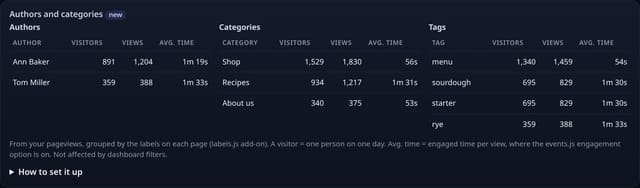
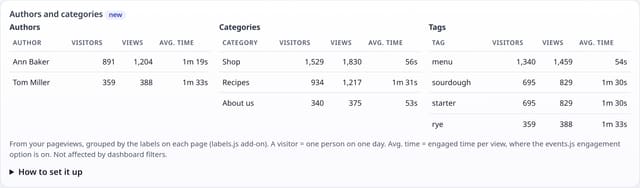
An Authors and categories card on your dashboard: visitors, views and average engaged time for each writer, section and tag, side by side, for any date range.
Why it matters
A blog or news site is planned by writer and topic, not by URL. Seeing that one author or one category brings most readers tells you what to write next.
How it works
- Add the optional labels.js add-on next to your quietstats tag.
- On each page load it reads the page’s own labels: <meta name="author">, article:section and up to 3 article:tag, or data-qs-author, data-qs-category and data-qs-tags on any element.
- quietstats keeps one row per page with those labels, and only writes when they are new or change.
- The card groups your existing pageviews by those labels: visitors (one person on one day), views and average engaged time.
Set it up
<script data-host="https://quietstats.co.uk" data-site="YOUR_SITE_ID" data-dnt="true" src="https://quietstats.co.uk/js/labels.js" async defer></script>Replace YOUR_SITE_ID with the ID on your site’s settings page. Install guides →
Privacy: what is and isn’t collected
Collected
- Labels from your own pages: author, category and tags
- Nothing about visitors: the add-on reads the page, not the person
Never collected
- Cookies, localStorage or anything else stored on the visitor’s device
- IP addresses or user agents (used in memory, then discarded)
- Anything that links a visitor across days (the visitor ID resets daily)
Rows and limits
- Optional add-on of about 1 KB; the core script stays 845 B
- Up to 3 tags per page; labels that look like an email address or phone number are dropped
- Avg. time needs the events.js engagement option
- Rows: 1 row per labelled page, written only when its labels change; 1 read per dashboard view
“Rows” are database rows written, which is what our hosting is billed on. Reads are not rows written. Methodology →
Questions
Does WordPress already have these tags?
Most themes and SEO plugins (such as Yoast) add the author meta tag and article:section / article:tag. If yours does not, add data-qs-author or data-qs-category to any element.
Is an author’s name personal data?
It is the name you publish on the page. quietstats stores it as a label for the page, never anything about readers.
What if a page has no labels?
Nothing is sent for that page, and it is simply left out of the card.
Related features
Try it on your own site
Free during launch: one site and 5,000 pageviews a month, no card needed. After launch, paid plans start at £5 a month.