Display preferences: dark mode, reduced motion and data saving
The share of visitors who prefer dark mode, reduced motion or data saving.
In every plan, including Free. See your traffic.
What it is
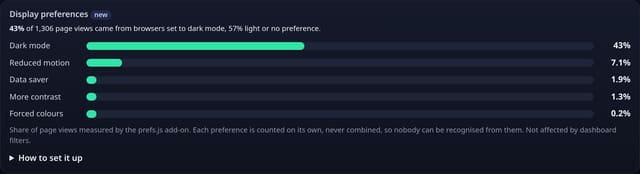
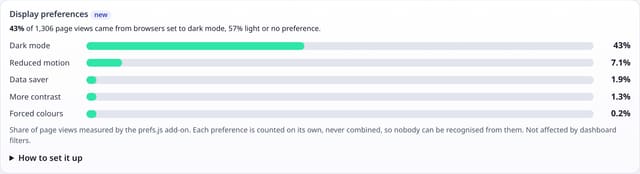
A Display preferences card on your dashboard: the share of page views from browsers set to dark mode, reduced motion, data saving, more contrast or forced colours.
Why it matters
If a third of your readers use dark mode, your dark theme deserves as much care as the light one. If people ask for less motion or data, heavy animations and autoplaying video are working against them. Design for how people actually browse.
How it works
- Add the small prefs.js add-on next to your quietstats tag (it sends no pageviews).
- Once per page load it reads five yes-or-no settings the browser already shares with every website through CSS media queries.
- The collector adds each one to its own daily total for your site. They are never stored together, so they cannot be combined into a profile.
- The card shows each total as a share of the page views measured.
Set it up
<script data-host="https://quietstats.co.uk" data-site="YOUR_SITE_ID" data-dnt="true" src="https://quietstats.co.uk/js/prefs.js" async defer></script>Replace YOUR_SITE_ID with the ID on your site’s settings page. Install guides →
Privacy: what is and isn’t collected
Collected
- One daily count of page views measured, and one daily count per preference
- Never stored together, never per visitor, page or time of day
Never collected
- Cookies, localStorage or anything else stored on the visitor’s device
- IP addresses or user agents (used in memory, then discarded)
- Anything that links a visitor across days (the visitor ID resets daily)
Rows and limits
- Optional add-on: script.js stays 845 bytes
- Rows: 1 written per page load with the add-on, at most 1 stored per site per day
- Data saver is only reported by some browsers (mostly Chrome on Android)
- Not affected by dashboard filters
“Rows” are database rows written, which is what our hosting is billed on. Reads are not rows written. Methodology →
Questions
Can this be used to fingerprint visitors?
No. Each preference is added to a separate daily total the moment it arrives. No combination of settings is kept, and there is no visitor ID, page or time with it.
Why measure dark mode?
It tells you how many people see your dark theme, so you know where to check contrast and images first.
Does it respect Do Not Track?
Yes, with data-dnt="true" the add-on does nothing for browsers that send Do Not Track or Global Privacy Control, and the collector skips them too.
Related features
Try it on your own site
Free during launch: one site and 5,000 pageviews a month, no card needed. After launch, paid plans start at £5 a month.