Page speed budgets: catch slow releases early
Set a speed target for your whole site or a group of pages and get an alert when real visitors start seeing slower loads.
In every plan, including Free. Behaviour and content.
What it is
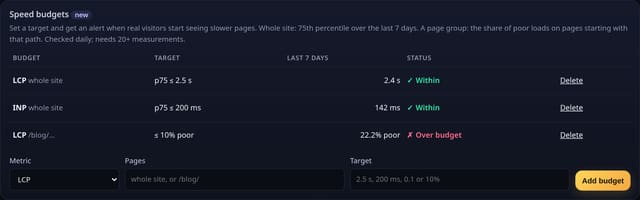
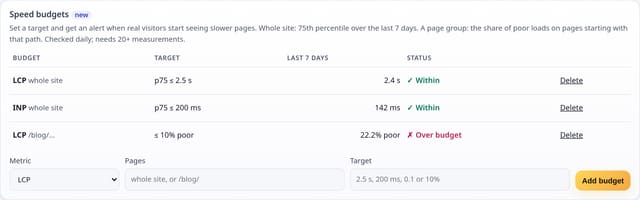
A Speed budgets card under Page speed: each budget with its target, the last 7 days from real visitors and whether it is within or over. Add one in a few seconds; a daily check adds an alert to your inbox when a budget is missed.
Why it matters
A new image carousel or a heavy script can make every page slower without anyone noticing. A budget turns “the site feels slow” into an alert on the day it starts, with the number that changed.
How it works
- Add the page-speed add-on (Page speed card) so real visitors’ load times are counted as daily totals.
- Add a budget: pick LCP, INP or CLS. For the whole site set the 75th percentile you accept, such as 2.5 s for LCP or 200 ms for INP. For a group of pages, such as /blog/, set the most poor loads you accept, such as 10%.
- Every day quietstats works out the last 7 days from the totals you already have. When a budget goes from within to over, one alert appears in Alerts.
- Budgets need at least 20 measurements before they are judged.
Set it up
Nothing to set up: it works with the standard one-line script.
<script data-host="https://quietstats.co.uk" data-dnt="true" src="https://quietstats.co.uk/js/script.js" id="YOUR_SITE_ID" async defer></script>Privacy: what is and isn’t collected
Collected
- Nothing new: built from the existing daily page-speed totals (bucket counts per day and poor counts per page)
- No single visit, visitor ID or timing is stored
Never collected
- Cookies, localStorage or anything else stored on the visitor’s device
- IP addresses or user agents (used in memory, then discarded)
- Anything that links a visitor across days (the visitor ID resets daily)
Rows and limits
- Whole-site budgets use the 75th percentile, estimated within exact Core Web Vitals buckets
- Page-group budgets use the share of poor loads, because per-page totals keep good/poor counts only
- Up to 12 budgets per site; checked once a day; alert emails are off
- Rows: 1 per budget; the daily check writes only when a budget changes state; 1 + 1 per page-group budget reads
“Rows” are database rows written, which is what our hosting is billed on. Reads are not rows written. Methodology →
Questions
What targets should I start with?
Google’s “good” limits: LCP 2.5 s, INP 200 ms, CLS 0.1 for the whole site.
Why a share of poor loads for page groups?
Per-page totals keep how many loads were poor rather than a full spread, so a share is exact while a percentile would be a guess.
Will I get an alert every day while over budget?
No. One alert when it goes over; another only if it recovers and goes over again.
Related features
Try it on your own site
Free during launch: one site and 5,000 pageviews a month, no card needed. After launch, paid plans start at £5 a month.