JavaScript errors: which scripts break, on which pages
See the JavaScript errors your visitors hit, on which pages and how often, without an error-tracking service.
In every plan, including Free. Behaviour and content.
What it is
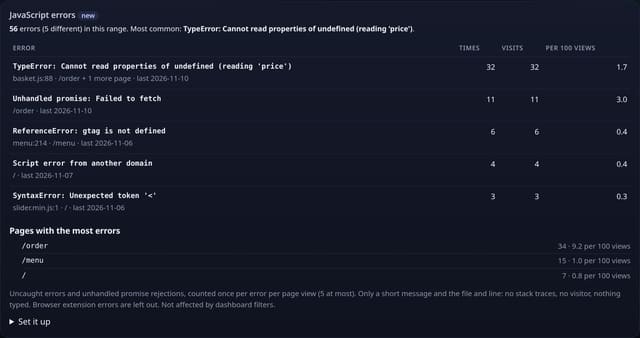
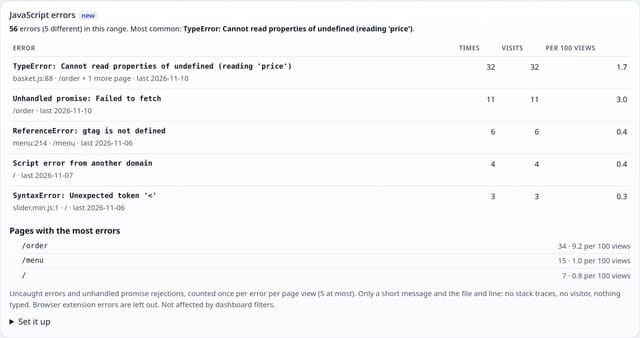
A JavaScript errors card on your dashboard: each error’s short message with the file and line, how many times it happened, how many visits hit it and the rate per 100 page views of the pages it happened on, plus the pages with the most errors.
Why it matters
A broken script quietly stops a basket, a form or a menu working for some browsers, and you only hear about it when sales drop. The errors card tells you the day it starts, which page it is on and how many people it affects.
How it works
- Add the small errors.js add-on next to your quietstats tag (it sends no pageviews).
- When a script throws an error nobody catches, or a promise fails with no handler, the add-on sends one short label: the message, then the file name and line, such as “TypeError: basket is undefined @ shop.js:42”.
- The message is tidied first: runs of 4 or more digits become #, long quoted text is cut short and web addresses keep only the file name. Errors from browser extensions are ignored.
- Each error is sent once per page view, at most 5 per page view. quietstats adds them up per error and page.
Privacy: what is and isn’t collected
Collected
- A short error message (max 100 characters) with the file name and line, page path and day
- Never stack traces, what anyone types, or anything about the visitor; a message with an email address or long number is stored without its label
Never collected
- Cookies, localStorage or anything else stored on the visitor’s device
- IP addresses or user agents (used in memory, then discarded)
- Anything that links a visitor across days (the visitor ID resets daily)
Rows and limits
- Optional add-on: script.js stays 845 bytes
- Errors from scripts on another domain often only say “Script error” (browsers hide the detail unless that script allows it)
- Errors your own code catches are not counted
- Not affected by dashboard filters
- Rows: 1 written per distinct error per page view (5 at most); 2 reads per dashboard view
“Rows” are database rows written, which is what our hosting is billed on. Reads are not rows written. Methodology →
Questions
Is this a replacement for Sentry?
No. It tells you that an error is happening, where and how often, which is enough to spot a broken release. For stack traces and debugging, use a full error tracker.
Will it slow my site?
It is a small separate file that loads after the page and sends a message only when an error happens.
Can error messages contain personal data?
They can, so the add-on cuts long quoted text and numbers, and quietstats drops any label that still looks like an email address or a long number.
Related features
Set it up
<script data-host="https://quietstats.co.uk" data-site="YOUR_SITE_ID" data-dnt="true" src="https://quietstats.co.uk/js/errors.js" async defer></script>Replace YOUR_SITE_ID with the ID on your site’s settings page. Install guides →
Try it on your own site
Free during launch: one site and 5,000 pageviews a month, no card needed. After launch, paid plans start at £5 a month.