Uptime checks: know when your site was down
We check your homepage every 10 minutes and show availability, how fast it answered and any downtime next to your traffic.
In every plan, including Free. Behaviour and content.
What it is
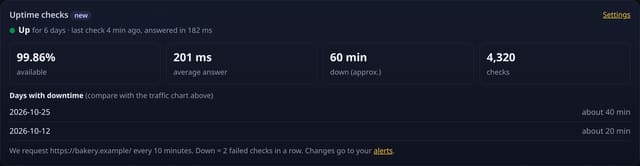
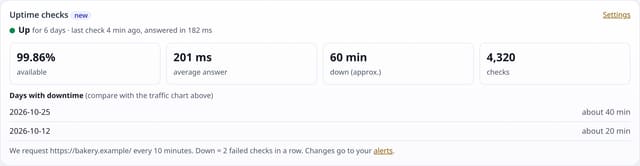
An Uptime checks card on your dashboard: up or down right now, availability for the range, average answer time, approximate minutes down and the days with downtime. Each change to down or back up lands in your alerts.
Why it matters
A sudden drop in visitors is often not your content: the site was down. Seeing outages next to your traffic explains the dip, and the alert tells you while it is happening.
How it works
- Switch it on per site under Sites → Manage → Uptime checks.
- Every 10 minutes quietstats requests https://your-domain/ once. Any 2xx or 3xx answer within 8 seconds counts as up.
- Down means two failed checks in a row, so a single blip never raises an alarm. Each change to down or back up adds one alert to your alerts inbox.
- Availability = share of checks while the site was not down; minutes down are estimated from the 10-minute checks.
Set it up
Nothing to set up: it works with the standard one-line script.
<script data-host="https://quietstats.co.uk" data-dnt="true" src="https://quietstats.co.uk/js/script.js" id="YOUR_SITE_ID" async defer></script>Privacy: what is and isn’t collected
Collected
- Only the result of requesting your public homepage: up or down, HTTP status and how long it took
- No visitor data at all
Never collected
- Cookies, localStorage or anything else stored on the visitor’s device
- IP addresses or user agents (used in memory, then discarded)
- Anything that links a visitor across days (the visitor ID resets daily)
Rows and limits
- Homepage only, every 10 minutes, from Cloudflare’s network
- Downtime shorter than two checks may not show; minutes are approximate
- Alerts go to the alerts inbox; alert emails are off
- Rows: about 288 per site per day while on (2 small upserts per check); 2 reads per dashboard view
“Rows” are database rows written, which is what our hosting is billed on. Reads are not rows written. Methodology →
Questions
Does this count as a visit?
No. Our checker never runs the tracking script and identifies itself in its user agent, so it never appears in your stats.
Can I check other pages?
Not yet: only the homepage.
Does it cost extra?
No. It is on every plan.
Related features
Try it on your own site
Free during launch: one site and 5,000 pageviews a month, no card needed. After launch, paid plans start at £5 a month.