Video plays and progress: see how far people watch
How many people press play on your videos and how many reach 25%, 50%, 75% and the end.
In every plan, including Free. Behaviour and content.
What it is
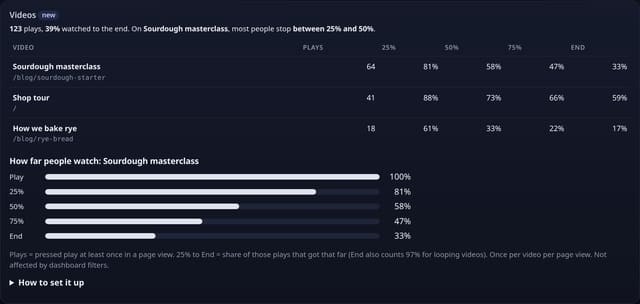
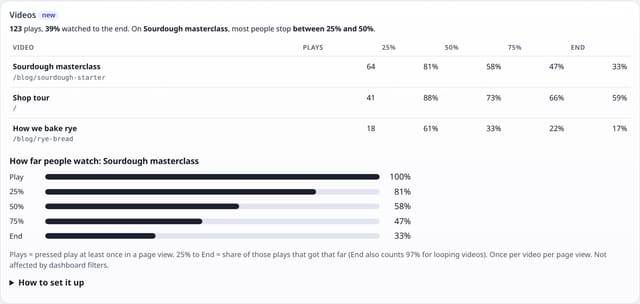
A Videos card on your dashboard: every video with its plays and the share of plays that reached 25%, 50%, 75% and the end, plus a bar chart for your most-played video showing where people stop watching.
Why it matters
A product demo or explainer only works if people watch it. Knowing that half of viewers stop before the halfway point tells you to shorten it or put the key message first.
How it works
- Add the small video.js add-on next to your quietstats tag (it sends no pageviews).
- The first time a video starts playing in a page view, it counts as one play.
- As playback first passes 25%, 50%, 75% and the end (97% for looping videos), each point counts once for that video in that page view.
- Videos are named by data-qs-video, then their title, aria-label or file name. It works with HTML5 <video> elements, including ones added after the page loads.
Set it up
<script data-host="https://quietstats.co.uk" data-site="YOUR_SITE_ID" data-dnt="true" src="https://quietstats.co.uk/js/video.js" async defer></script>Replace YOUR_SITE_ID with the ID on your site’s settings page. Install guides →
Privacy: what is and isn’t collected
Collected
- Video name, which point was reached (25, 50, 75 or 100%), page path, day
- Never a watch history: no seek positions, timings or pauses, nothing linking views together
Never collected
- Cookies, localStorage or anything else stored on the visitor’s device
- IP addresses or user agents (used in memory, then discarded)
- Anything that links a visitor across days (the visitor ID resets daily)
Rows and limits
- Optional add-on: script.js stays 845 bytes
- HTML5 <video> only for now; YouTube and Vimeo embeds are not counted yet
- Skipping ahead counts the points skipped past
- Not affected by dashboard filters
- Rows: up to 5 per video per page view where it was played; 1 read per dashboard view
“Rows” are database rows written, which is what our hosting is billed on. Reads are not rows written. Methodology →
Questions
Can I use a finished video as a goal?
Yes. Add an event goal for “Video progress” to count every milestone, or track plays with “Video played”.
Does it work with autoplaying or looping videos?
Yes. Autoplay counts as a play once it starts, and looping videos count the end once at 97% so a loop is never counted twice.
Does it slow my video down?
No. It only listens to the play and time events the browser already fires, and sends at most five tiny requests per video per page view.
Related features
Try it on your own site
Free during launch: one site and 5,000 pageviews a month, no card needed. After launch, paid plans start at £5 a month.