Best times: busiest hours and when to publish
Your busiest hours and day, your quietest window, and a suggested time to publish, worked out from when visitors really arrive.
In every plan, including Free. See your traffic.
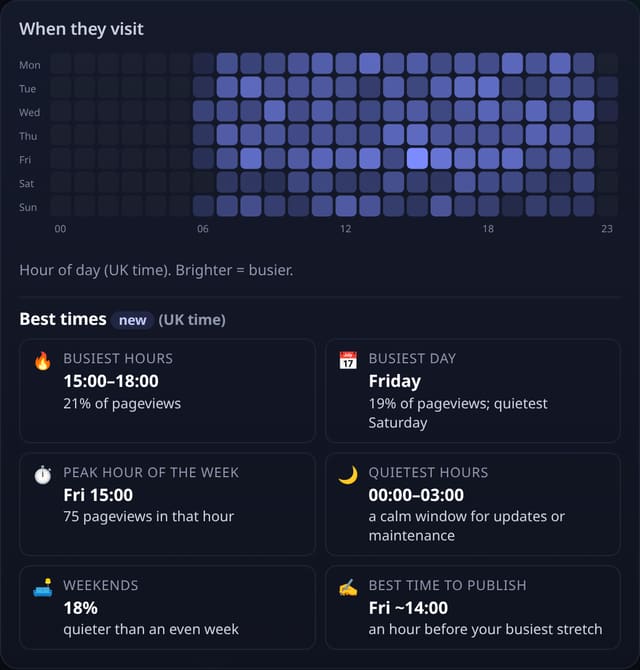
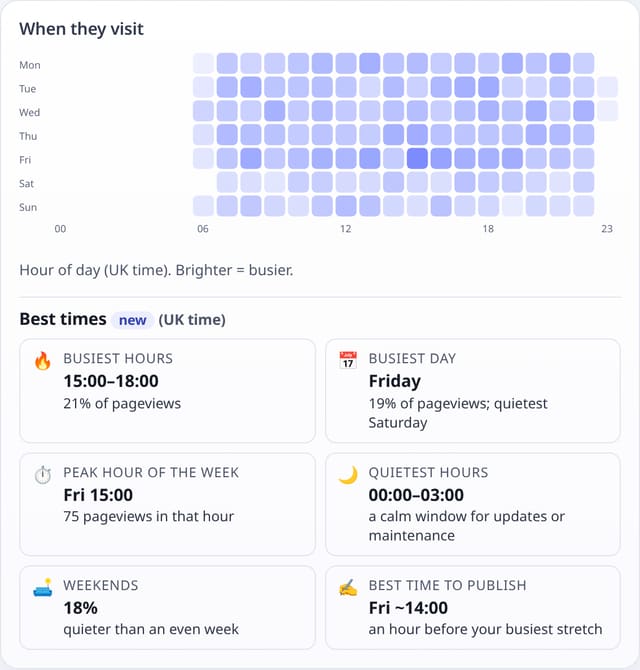
What it is
Under the weekday × hour heatmap, a Best times panel answers the questions the heatmap raises: your busiest three hours, your busiest and quietest day, the single busiest hour of the week, your quietest three hours (a good window for updates or maintenance), how much traffic comes at weekends, and a suggested time to publish.
Why it matters
Sending a newsletter, posting on social media or shipping a big change goes better when you know when your readers are around, and when they are not.
How it works
- Uses the same pageviews as the heatmap, in your site’s own timezone (set it under Manage site).
- Busiest and quietest windows are three hours long and can run past midnight.
- Weekends are compared with an even spread (2 of 7 days, about 29%).
- The suggested time to publish is an hour before your busiest stretch, on your busiest day, so a post is fresh when most people arrive.
- Appears once there are 50 pageviews in the range, and follows any filter on the dashboard.
Set it up
Nothing to set up: it works with the standard one-line script.
<script data-host="https://quietstats.co.uk" data-dnt="true" src="https://quietstats.co.uk/js/script.js" id="YOUR_SITE_ID" async defer></script>Privacy: what is and isn’t collected
Collected
- Nothing new: pageview times you already collect
Never collected
- Cookies, localStorage or anything else stored on the visitor’s device
- IP addresses or user agents (used in memory, then discarded)
- Anything that links a visitor across days (the visitor ID resets daily)
Rows and limits
- Needs 50 pageviews in the range
- Rows: 0 read beyond the dashboard, 0 written
“Rows” are database rows written, which is what our hosting is billed on. Reads are not rows written. Methodology →
Questions
Which timezone is used?
Your site’s own timezone from Manage site, UK time by default. The panel says which one.
Can I see it for one page?
Yes. Click a page on the dashboard to filter by it, and the heatmap and best times follow.
Related features
Try it on your own site
Free during launch: one site and 5,000 pageviews a month, no card needed. After launch, paid plans start at £5 a month.