How to use Google Sheets feed (IMPORTDATA)
Put your quietstats numbers in a Google Sheet with one formula. No Apps Script, no add-on and no Google sign-in.

What it does
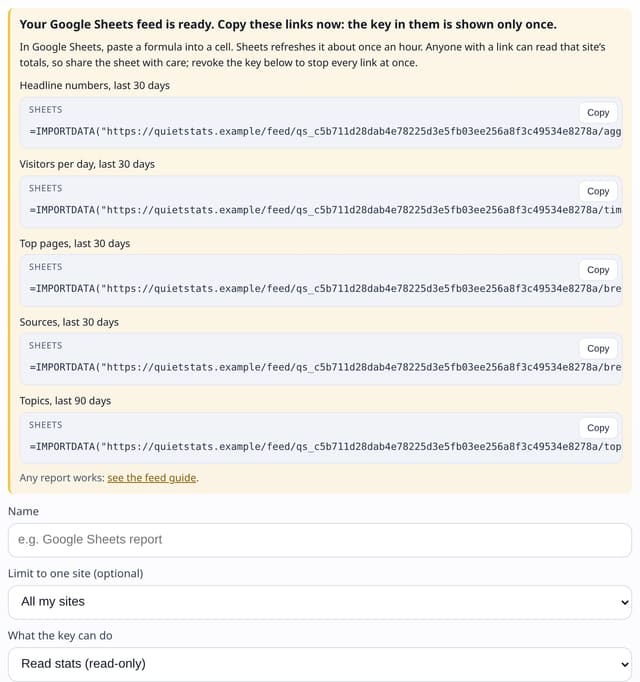
A Google Sheets feed key belongs to one site and can only read that site’s totals as CSV. quietstats shows ready-made =IMPORTDATA() formulas when you create it: headline numbers, visitors per day, top pages, sources and topics, and any other report works by changing the link. Google Sheets refreshes the formulas about once an hour.
Why it matters
Most people who want their numbers in a spreadsheet do not want to write code or connect another Google app. A link that returns CSV is the simplest thing that works.
How to use it
- In Settings → API keys, pick the site and choose “Google Sheets feed”, then create the key.
- Copy a formula, for example =IMPORTDATA("…/feed/KEY/timeseries.csv?period=30d&interval=day"), into a cell.
- Change the report name or the query to get other numbers; the site is always the key’s own.
- To stop the sheet updating, revoke the key.
How it works
- Settings → API keys: name the key, pick the site and choose “Google Sheets feed”.
- Copy one of the formulas shown (the key appears only once) into a cell in Google Sheets.
- Change the report or period in the link if you like, for example timeseries.csv?period=90d&interval=week.
- Revoke the key to stop every link straight away.
Privacy
- Collected: Nothing new
- Not collected: Your Google account: there is no Google sign-in
- Not collected: Visitor IDs, IP addresses or single visits
- No cookies, and nothing stored on the visitor’s device.
- Reports show totals only: never a visitor list, IP address or single visit.
Limits
- Anyone with a link can read that one site’s totals, so share the sheet with care
- Results are refreshed at most every 10 minutes on our side and about hourly by Google
- Counts towards the key’s hourly limit only when the data is refreshed
- One site per key; up to 10 active keys of any kind
Plans
Every plan, including Free. quietstats is free during launch: the Free plan covers 1 site and 5,000 pageviews a month, and no card is needed. See pricing.
Questions
Does it work in Excel?
Yes: Excel’s Data → From Web accepts the same CSV link.
Is the key safe in a link?
It can only read one site’s totals as CSV and nothing else, and you can revoke it at any time. Treat the sheet like a shared report.
Which reports can I use?
aggregate, timeseries, breakdown, events, pathways, landing, groups, engagement, topics, products, places, page and ab_tests.
Set it up
Show the install snippet
=IMPORTDATA("https://quietstats.co.uk/feed/qs_your_feed_key/breakdown.csv?period=30d&property=page&limit=50")Replace YOUR_SITE_ID with the ID shown on your site’s Manage page.
Related
Feature page: Google Sheets feed: live numbers with =IMPORTDATA() → What it is, why it matters, privacy and how other tools do it.