How to use stats API v2
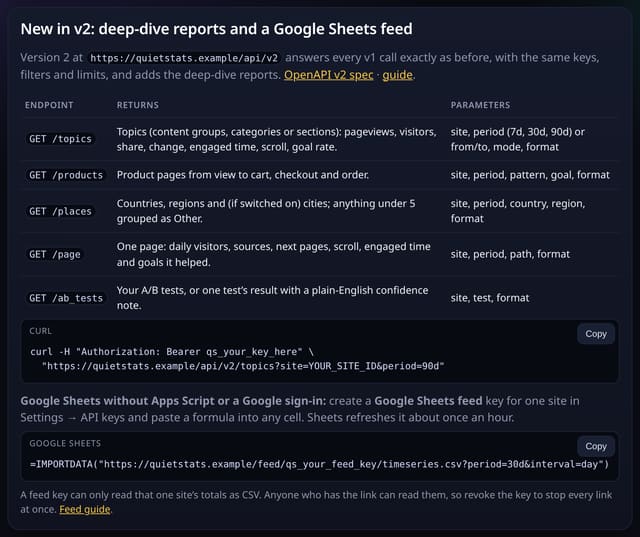
Version 2 of the Stats API keeps every v1 call exactly as it was and adds topics, products, places, page deep dives and A/B test results.
What it does
Call /api/v2 with the same read-only keys, filters, pagination and rate limits as v1. The new endpoints /topics, /products, /places, /page and /ab_tests return the same numbers as the matching deep-dive screens, as JSON or CSV, with an OpenAPI 3.1 description at /api/v2/openapi.json.
Why it matters
The deep dives answer bigger questions than a single breakdown. Having them in the API means a weekly report, a client dashboard or an AI assistant can use them too.
How to use it
- Use a read key from Settings → API keys.
- Base URL: /api/v2. Every v1 endpoint works there unchanged.
- New: /topics, /products, /places, /page?path=/x and /ab_tests (add test=ID for a result).
- Add format=csv for a spreadsheet; the full description is at /api/v2/openapi.json.
How it works
- Create a read key in Settings → API keys (or reuse one).
- Swap /api/v1 for /api/v2 in your base URL; nothing else changes for existing calls.
- Call the new endpoints, for example /api/v2/topics?site=ID&period=90d, and add format=csv for a spreadsheet.
Privacy
- Collected: Nothing new
- Not collected: Visitor IDs, IP addresses or single visits
- No cookies, and nothing stored on the visitor’s device.
- Reports show totals only: never a visitor list, IP address or single visit.
Limits
- The deep-dive endpoints cover up to 92 days (period 7d, 30d or 90d, or from and to)
- Places keeps the under-5 grouping and shows cities only when city totals are on
- Same requests per hour per key as v1
- D1: each deep-dive response is cached for 10 minutes, so repeat calls read nothing
Plans
Every plan, including Free. quietstats is free during launch: the Free plan covers 1 site and 5,000 pageviews a month, and no card is needed. See pricing.
Questions
Do I have to move to v2?
No. v1 stays as it is. v2 is v1 plus the new endpoints.
Can I use the new reports in Sheets?
Yes: with a Google Sheets feed key, any of them works in =IMPORTDATA().
Set it up
Show the install snippet
curl -H "Authorization: Bearer qs_…" "https://quietstats.co.uk/api/v2/products?site=YOUR_SITE_ID&period=30d&format=csv"Replace YOUR_SITE_ID with the ID shown on your site’s Manage page.
Related
Feature page: Stats API v2: the deep-dive reports as JSON or CSV → What it is, why it matters, privacy and how other tools do it.