How to use holiday markers: public holidays against your usual days
UK bank holidays and US federal holidays against the same weekday around them, past and coming up.
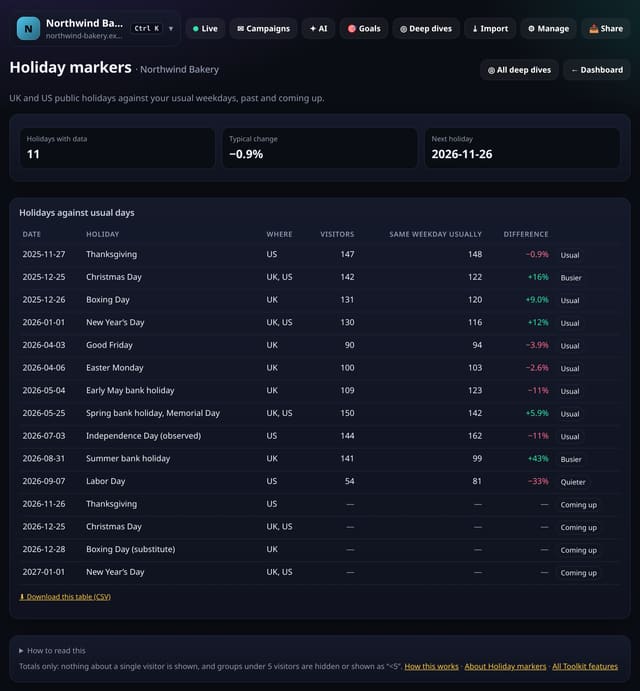
What it does
For each UK (England and Wales) bank holiday and US federal holiday in your stored daily totals, quietstats compares visitors with the same weekday one, two and three weeks either side, and labels it Quieter, Busier or Usual. The next holidays are listed too.
Why it matters
Holidays explain a lot of dips and spikes. Knowing how your audience behaves on them helps plan campaigns and calm nerves.
How to use it
- Open Toolkit → Movers and changes → Holiday markers, or search “Holiday markers” on All reports (or go to /app/kit/holidays?site=YOUR_SITE).
How it works
- Open your dashboard and choose Toolkit in the menu (or the Toolkit button on Deep dives, or search for it on All reports).
- Under Movers and changes, tap Holiday markers.
- Use the buttons on the screen; nothing is sent anywhere.
Privacy
- Collected: Nothing new from your visitors
- Not collected: Anything about a single visitor
- Not collected: Links between days: visitor ids still reset at midnight
- No cookies, and nothing stored on the visitor’s device.
- Reports show totals only: never a visitor list, IP address or single visit.
Limits
- UK (England and Wales) and US federal holidays, 2025–2027
- Uses stored daily totals
- Read from the database only when you open it, then kept for 10 minutes
Plans
Every plan, including Free. quietstats is free during launch: the Free plan covers 1 site and 5,000 pageviews a month, and no card is needed. See pricing.
Questions
Does it collect anything new?
No. It works from the pageviews, events and goals you already have, read when you open the screen and kept as totals for 10 minutes. Groups under 5 visitors are never shown exactly.
Related
Feature page: Holiday markers: public holidays against your usual days → What it is, why it matters, privacy and how other tools do it.