How to use AI search visibility
For ChatGPT, Perplexity, Gemini, Copilot and Claude, see how many people each one sent you, and separately how often its crawlers read your pages.
What it does
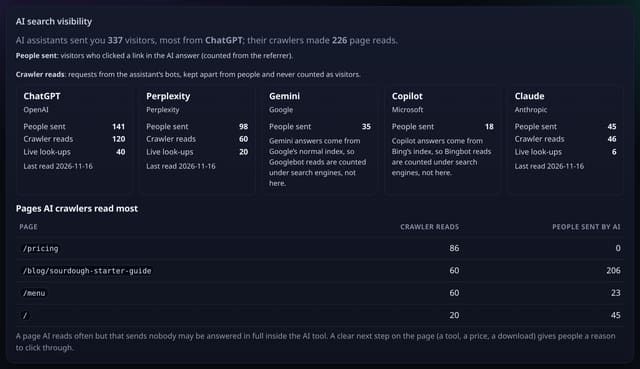
A card at the top of your AI referrals page with one panel per AI assistant. People sent counts visitors who clicked a link in an AI answer (from the referrer). Crawler reads counts requests from that assistant’s own bots, including live look-ups made when someone asks it a question. The two are never mixed: bots are not visitors. Below that, the pages AI crawlers read most sit next to how many people AI sent to each one.
Why it matters
AI answers are a new front page for the web. Seeing that ChatGPT reads your guide 40 times a week but sends 7 people tells you whether you are being quoted, clicked, or just summarised.
How to use it
- On your dashboard, open AI (or go to /app/ai for the site). AI search visibility is the first card.
- Each assistant shows People sent (clicks from its answers) and, where it has its own crawlers, Crawler reads and Live look-ups.
- To fill in crawler reads, add the small server-side hook from the AI crawler card on your dashboard once. Nothing is added to script.js.
- Use Pages AI crawlers read most to spot pages that are read a lot but send few people, and give them a clear next step.
How it works
- Open AI on your dashboard (/app/ai). The AI search visibility card is at the top.
- People sent comes from the visits you already collect: a pageview whose referrer is chatgpt.com, perplexity.ai, gemini.google.com, copilot.microsoft.com or claude.ai.
- Crawler reads come from the AI crawler report: daily totals per crawler family (for example GPTBot, OAI-SearchBot and ChatGPT-User for ChatGPT). Turn it on once with the small server-side hook from the AI crawler card.
- Gemini and Copilot answer from Google’s and Bing’s normal search indexes, so their reads are counted as search engine reads, and the card says so.
Privacy
- Collected: Nothing new: it combines your AI referrals and AI crawler totals
- Not collected: Crawler IP addresses or user agents (only the crawler family is kept)
- Not collected: Which AI question led anyone to your site (assistants do not send it)
- Not collected: Anything about a single visitor
- No cookies, and nothing stored on the visitor’s device.
- Reports show totals only: never a visitor list, IP address or single visit.
Limits
- Assistants that open links without a referrer show as Direct, as in every analytics tool
- Crawler reads need the one-off server-side hook (script.js cannot see bots)
- Crawler names are matched by user agent, not verified by IP
- Reads only: 0 writes, 3 small extra reads per view
Plans
Every plan, including Free. quietstats is free during launch: the Free plan covers 1 site and 5,000 pageviews a month, and no card is needed. See pricing.
Questions
Why are Gemini and Copilot crawler reads empty?
They answer from Google’s and Bing’s search indexes, so the bots that read your pages for them are Googlebot and Bingbot. Those are counted as search engines on the AI crawler card, not as AI reads.
Do crawler reads count as visitors?
No. Crawlers are never counted as visitors or pageviews anywhere in quietstats.
What is a live look-up?
A request made by the assistant at the moment someone asks it a question (for example ChatGPT-User or Claude-User), rather than a crawl for training or indexing.
Related
Feature page: AI search visibility: people sent vs crawler reads → What it is, why it matters, privacy and how other tools do it.