How to use reading quadrant: read, skimmed, stuck or missed
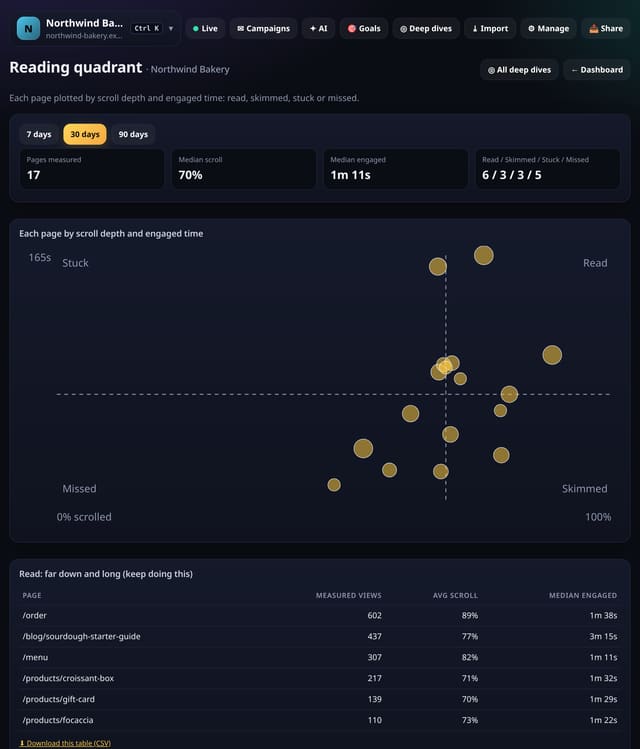
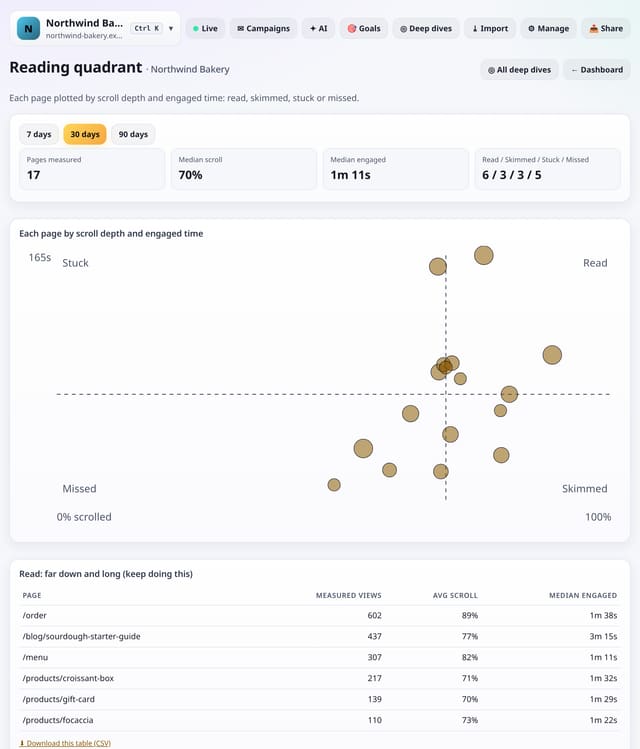
Every page plotted by scroll depth and engaged time against your own medians, sorted into four groups with a fix for each.
What it does
Using the optional data-engage measurements, quietstats plots each page with 10+ measured views by average scroll depth (across) and median engaged time (up). Your site’s medians split the chart into Read (far and long), Skimmed (far but quick), Stuck (long but shallow) and Missed (short and shallow), with a table for each.
Why it matters
One number per page hides why it works or not. The quadrant tells you what to do: make the point stand out, fix what holds people up near the top, or rethink the promise.
How to use it
- Open Deep dives → Analysis lab → Reading quadrant (or go to /app/lab/reading?site=YOUR_SITE).
- Choose 7, 30 or 90 days; long-range trends read best at 90.
- Download any table with its CSV link; small numbers show as “<5” there too.
How it works
- Open your dashboard, go to Deep dives and scroll to Analysis lab.
- Under Content, tap Reading quadrant.
- Pick 7, 30 or 90 days (and any options at the top), read the “How to read this” notes, and download any table as CSV.
Privacy
- Collected: Nothing new: it reads the pageviews (and goals, events or speed checks) you already have
- Not collected: Anything about a single visitor
- Not collected: Links between days: visitor ids still reset at midnight
- No cookies, and nothing stored on the visitor’s device.
- Reports show totals only: never a visitor list, IP address or single visit.
Limits
- Needs data-engage on your script tag; pages need 10+ measured views
- Up to 92 days and 200,000 pageviews per screen
- Read from the database only when you open it, then kept for 10 minutes
Plans
Every plan, including Free. quietstats is free during launch: the Free plan covers 1 site and 5,000 pageviews a month, and no card is needed. See pricing.
Questions
Why compare with my own medians?
A recipe and a contact page are read differently. Comparing your pages with each other gives fairer, more useful groups.
What if I see nothing?
Add data-engage to the quietstats script tag; measurements start with the next visits.
Related
Feature page: Reading quadrant: read, skimmed, stuck or missed → What it is, why it matters, privacy and how other tools do it.