Start free

How to use screen size trend: how your audience’s screens are changing

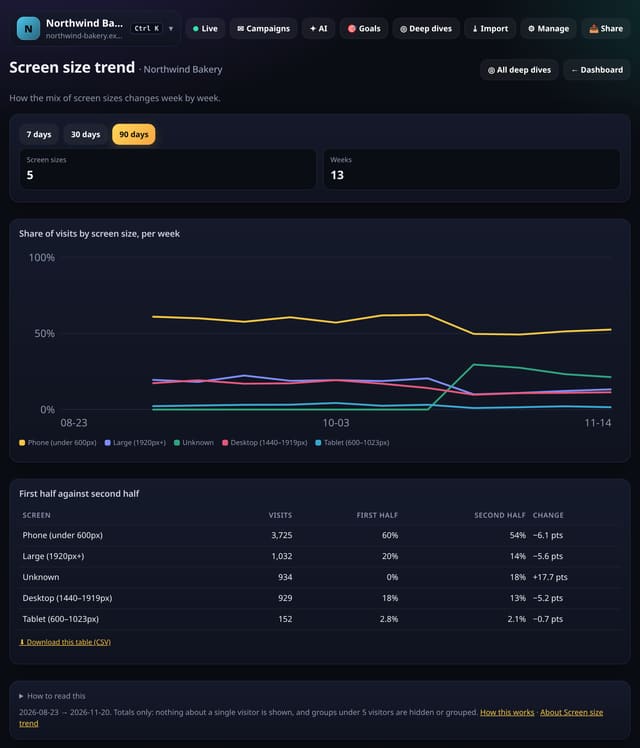
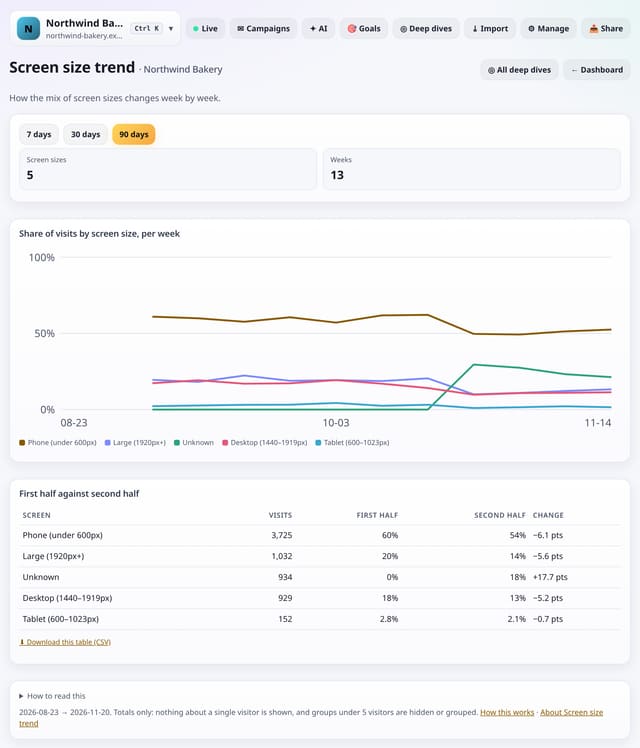
The share of visits from each screen size, week by week, with the first half of the range against the second.
Dashboard & reportsFeature page: Screen size trend: how your audience’s screens are changing
Screen size trend: how your audience’s screens are changing: example screenshotScreen size trend: how your audience’s screens are changing: example screenshot
Example screenshot with made-up data, not a real customer’s numbers.

What it does

quietstats groups visits by the rough screen size the script already sends, works out each size’s share per week and compares the first half of the range with the second.

Why it matters

A growing phone share is the signal to check your pages on a small screen first.

How to use it

  1. Open Deep dives → Analysis lab → Screen size trend, or search “Screen size trend” on All reports (or go to /app/lab/screentrend?site=YOUR_SITE).
  2. The default range is 90 days; pick another at the top.
  3. Download any table with its CSV link; small numbers show as “<5” there too.

How it works

How Screen size trend is worked out1. Visits are rebuilt from pageviews with the 30-minute rule. 2. Visits are grouped into weeks and screen sizes. (otherwise: Only totals are kept, never single visits.) 3. Each size’s share per week is worked out. 4. The first half of the range is compared with the second.1Visits are rebuilt frompageviews with the 30-minuterule.2Visits are grouped into weeksand screen sizes.Only totals arekept, neversingle visits.3Each size’s share per week isworked out.4The first half of the range iscompared with the second.
From src/lab4.js (screentrend) and src/labdata.js.

Privacy

Limits

Plans

Every plan, including Free. quietstats is free during launch: the Free plan covers 1 site and 5,000 pageviews a month, and no card is needed. See pricing.

Questions

Does it read the exact screen size?

No. Only a rough size group is used, so it cannot help identify anyone.

Does it store anything new?

No. It is worked out from the pageviews and events you already have when you open the screen, and only the totals are kept for 10 minutes.

Related

Feature page: Screen size trend: how your audience’s screens are changing → What it is, why it matters, privacy and how other tools do it.

Guides on this topic

All website analytics guides →

Related features

Browse all 448 features →

Explore quietstats

See your traffic (119)

Live visitors and live eventsTrend charts, headline cards and any date rangeCompare any two date rangesWorld map, countries and regionsDevices, browsers, operating systems and screens

Sources and campaigns (63)

Sources and channelsAI search referralsUTM campaignsSearch keywords from Google Search ConsoleShort links

Behaviour and content (80)

Top pagesPage transitionsScroll depth and engaged timeClick mapVisitor journeys

Goals, events and conversions (83)

Goals and funnelsCustom events and conversion ratesRevenue cards and revenue by sourceEngagement goalsA/B tests with your own tags and a plain-English confidence note

Reports, sharing and alerts (44)

Alerts inbox and rulesReport snapshotsPassword-protected snapshotsOptional public stats pageAnonymous benchmarks against similar sites

Data in and out (42)

CSV and Excel downloadsStats APIImport from Plausible or GA4API playgroundTSV and XML export for every report

Privacy and performance (17)

Zero cookies, privacy built inUnder 1 KB script and single-page appsPages never countedPrivacy proof page and badge for your siteSigned-in sessions

Why quietstats

Why quietstatsPricingLive demoStart free

Compare

quietstats comparedFeature comparisonvs Google Analyticsvs Plausiblevs Fathom Analyticsvs Simple Analyticsvs Umamivs Matomovs Cloudflare Web Analyticsvs GoatCountervs Piwik PROvs PostHogvs Microsoft Clarityvs Pirsch Analyticsvs MixpanelGoogle Analytics alternatives

Learn

Website analytics guidesMetrics handbookAnalytics glossaryPlaybooksGDPR and cookie-free analyticsInstall on SquarespaceInstall on WixInstall on GhostInstall on Google Tag ManagerBlog

Playbooks and tools

Script size calculatorCookie banner checkerPlaybook: Local businessPlaybook: Online shopPlaybook: Blog or publisherPlaybook: SaaS or appPlaybook: Charity or community groupPlaybook: Agency with clientsUTM link checkerConversion rate calculatorCookie banner traffic-loss calculator