How to use tracking pixel: count loads where JavaScript cannot run
A 1×1 image you can put in emails, partner pages or marketplaces that only counts loads per day.
What it does
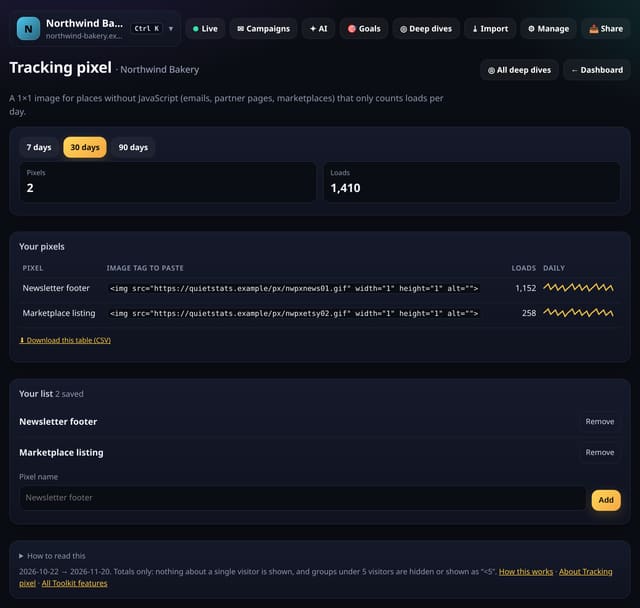
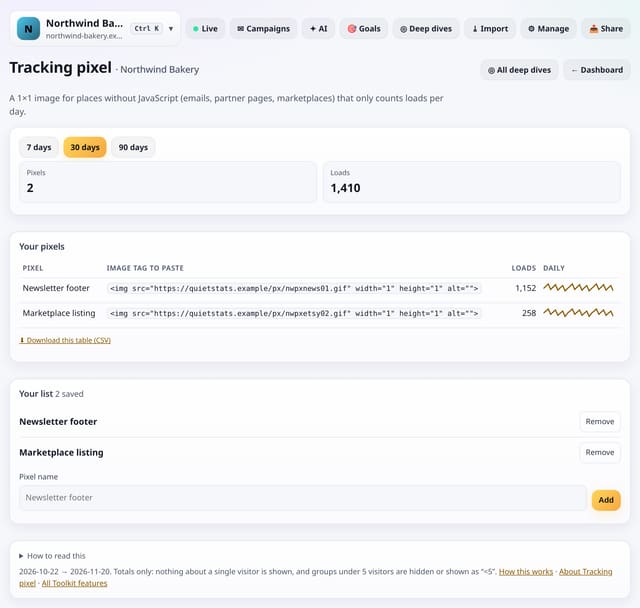
Name a pixel and copy its image tag. Each time the image loads, 1 is added to that pixel’s count for the day. The image is the same for everyone, it sets no cookie, and nothing about the person is read or stored.
Why it matters
Some places will not run your script: email newsletters, marketplace listings, a partner’s page. A pixel gives you a rough count there without tracking anyone.
How to use it
- Open Toolkit → Links, pixels and sharing → Tracking pixel, or search “Tracking pixel” on All reports (or go to /app/kit/pixels?site=YOUR_SITE).
- Name a pixel with the form, then copy the image tag from the table.
- The default range is 30 days; pick another at the top.
- Download any table with its CSV link; small numbers show as “<5” there too.
How it works
- Open your dashboard and choose Toolkit in the menu (or the Toolkit button on Deep dives, or search for it on All reports).
- Under Links, pixels and sharing, tap Tracking pixel.
- Save what you need with the form on the screen; everything you save can be removed with one tap.
Privacy
- Collected: Nothing new from your visitors. What you save in the Toolkit is kept for your site in your account
- Not collected: Anything about a single visitor
- Not collected: Links between days: visitor ids still reset at midnight
- No cookies, and nothing stored on the visitor’s device.
- Reports show totals only: never a visitor list, IP address or single visit.
Limits
- Up to 100 pixels
- Many email apps block or pre-load images, so loads are a rough count
- Counts under 5 show “<5”
- Up to 92 days and 200,000 pageviews per screen
- Read from the database only when you open it, then kept for 10 minutes
Plans
Every plan, including Free. quietstats is free during launch: the Free plan covers 1 site and 5,000 pageviews a month, and no card is needed. See pricing.
Questions
Who else has this?
Umami (Pixels) and GoatCounter (tracking pixel) have this. quietstats does it without cookies, IP addresses or following anyone over time: only counts from visits on the day.
Does it track who opened my email?
No. It counts loads per day for the pixel. It cannot tell who loaded it, and it keeps nothing that could.
Related
Feature page: Tracking pixel: count loads where JavaScript cannot run → What it is, why it matters, privacy and how other tools do it.