Auto-tracking v2: email and phone links, middle-clicks and CSS-class events
For many small businesses an email or a phone call is the conversion.
An optional add-on that counts clicks on email and phone links, links opened with a middle-click, and events named in a CSS class, for site builders that only let you add classes.
Why quietstats: you get this without cookies, a consent banner or storing IP addresses, in every plan including Free.
In every plan, including Free. Goals, events and conversions.
📘 Step-by-step guide, with screenshots and diagrams →
Start free, no cardSee live demo
- No cookies or consent banner
- No IP addresses stored
- Groups under 5 visitors hidden
- 845-byte script
- Free plan, no card
What it is
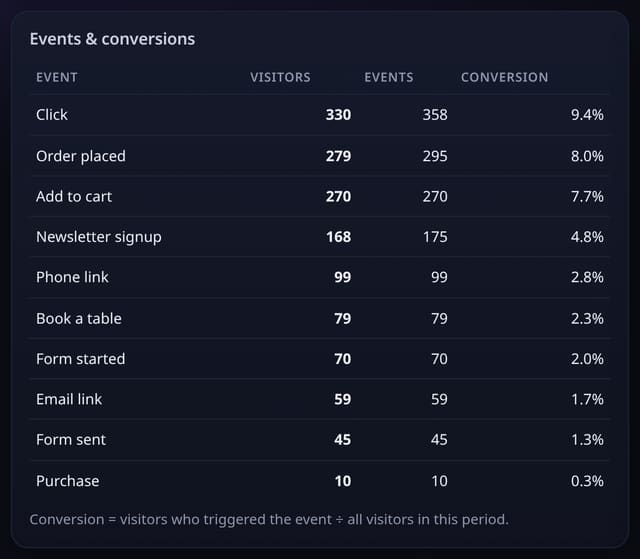
autolinks.js sits next to your quietstats tag or goes in the one-file bundle. A click on a mailto: link counts as Email link and a tel: link as Phone link, without the address or number. A middle-click (open in a new tab) on an outbound link or a file download counts as Outbound link or File download, the clicks the events script cannot see. Any element with a class such as qs-event-Signup counts Signup when clicked, with an optional qs-prop-Value class for a label.
Why it matters
For many small businesses an email or a phone call is the conversion. And WordPress blocks, Webflow and Squarespace often let you add a CSS class but not a data attribute, so class-based events make no-code tracking possible.
How it works
- Add the autolinks.js tag after your quietstats tag, or tick it in Manage site → One-file bundle.
- Email and phone link clicks start counting straight away.
- For a button, add the class qs-event-Name (use + for spaces, such as qs-event-Book+a+table) and optionally qs-prop-Label.
- Make goals from Email link, Phone link or your own names on the Goals card.
Privacy: what is and isn’t collected
Collected
- Event name (Email link, Phone link, Outbound link, File download or your class name) and the page it happened on
- Outbound host or download path for middle-clicks, and your optional qs-prop label
Never collected
- The email address or phone number
- Anything typed
- Cookies or anything stored in the browser
- Cookies, localStorage or anything else stored on the visitor’s device
- IP addresses or user agents (used in memory, then discarded)
- Anything that links a visitor across days (the visitor ID resets daily)
Rows and limits
- Elements that already have data-qs-event are left to the events script, so nothing counts twice
- Ordinary left-clicks on outbound links and downloads are counted by the events script with data-auto, not by this add-on
- autolinks.js is about 1.5 KB; script.js is unchanged at 845 bytes
- D1: 1 row per counted click, as for any custom event
“Rows” are database rows written, which is what our hosting is billed on. Reads are not rows written. Methodology →
Questions
Do I need the events script too?
No. autolinks.js sends its own events. Add events.js as well if you also want data-qs-event, goals from code or left-click outbound tracking.
Is the email address stored?
No. Only the words Email link or Phone link and the page are sent.
Why middle-clicks?
People often open links in a new tab with the middle button. Browsers do not report those as normal clicks, so they were missed before.
Related features
Goals, events and conversionsCustom events and conversion rates
Goals, events and conversionsClick goals (no code)
Goals, events and conversionsAttribution models: first touch, last touch, linear and position-based
Goals, events and conversionsProduct performance: every product page from view to order
Goals, events and conversionsPaths to goal: the pages people read before converting
Goals, events and conversionsA/B tests with your own tags and a plain-English confidence note
Goals, events and conversionsTracking pixel: count loads where JavaScript cannot run
Sources and campaigns
All goals, events and conversions features → · All features → · Docs: Auto-tracking v2 guide → · Compare features with other tools →
Guides on this topic
Set it up
<script data-host="https://quietstats.co.uk" data-site="YOUR_SITE_ID" data-dnt="true" src="https://quietstats.co.uk/js/autolinks.js" async defer></script>
<a class="wp-block-button__link qs-event-Book+a+table" href="/book">Book a table</a>
Replace YOUR_SITE_ID with the ID on your site’s settings page. Install guides →
Try it on your own site
Free during launch: one site and 5,000 pageviews a month, no card needed. After launch, paid plans start at £5 a month.