Page versions: one page before and after a change
Most page edits are never checked.
Changed a page? Pick the change from your What changed markers, or a day, and see how the page did in the days before and after it.
Why quietstats: you get this without cookies, a consent banner or storing IP addresses, in every plan including Free.
In every plan, including Free. Behaviour and content.
📘 Step-by-step guide, with screenshots and diagrams →
Start free, no cardSee live demo
- No cookies or consent banner
- No IP addresses stored
- Groups under 5 visitors hidden
- 845-byte script
- Free plan, no card
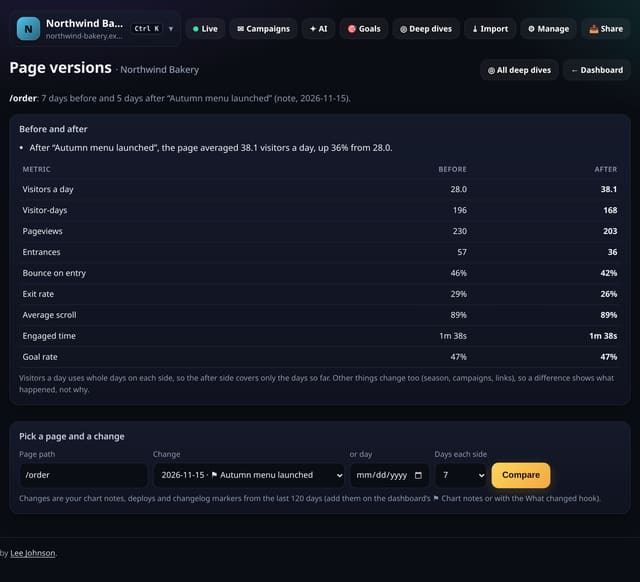
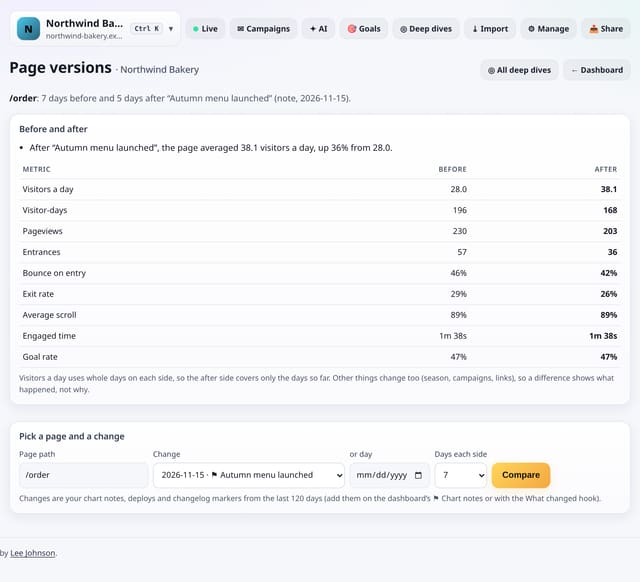
What it is
Page versions compares one page across a change: 7, 14 or 28 days before against the same number of days after (or the days so far). It shows visitors a day, visitor-days, pageviews, entrances, bounce on entry, exit rate, average scroll, engaged time and goal rate, with plain-English notes on what moved. Changes come from your chart notes, deploy markers and changelog markers, so a redesign you logged once can be checked any time.
Why it matters
Most page edits are never checked. A before-and-after on the numbers that matter tells you whether the new copy, layout or price helped, hurt or made no difference.
How it works
- Log the change: add a chart note on the dashboard, or send deploys with the What changed hook.
- Open Deep dives, choose Page versions, type the page path and pick the change (or a day).
- Choose 7, 14 or 28 days each side and read the notes and the table. From a page deep dive, tap Before / after on any change.
Privacy: what is and isn’t collected
Collected
- Nothing new: pageviews, optional engagement data, goals and your change markers
Never collected
- Anything about a single visitor
- Copies of your page
- Cookies, localStorage or anything else stored on the visitor’s device
- IP addresses or user agents (used in memory, then discarded)
- Anything that links a visitor across days (the visitor ID resets daily)
Rows and limits
- Compares numbers, not page content: quietstats never stores your pages
- A small sample (under 30 visitor-days a side) is flagged as a hint, not proof
- Up to 28 days each side; markers from the last 120 days are listed
- D1: one read of those days, cached for 10 minutes
“Rows” are database rows written, which is what our hosting is billed on. Reads are not rows written. Methodology →
Questions
Does this prove the change caused the difference?
No. Seasons, campaigns and links change too. It shows what happened around the change so you can judge.
What if the change was yesterday?
The after side covers the days so far and is labelled that way. Come back later for a fuller picture.
Can I compare without a marker?
Yes. Leave the change empty and pick a day.
Related features
See your trafficPage deep dive: everything about one page on one screen
Behaviour and contentCompare any two date ranges
See your trafficContent trends: fading and growing pages
Behaviour and contentTopic reports: how each part of your content performs over time
Behaviour and contentNew page half-life: how fast attention fades
Behaviour and contentPrivacy proof page and badge for your site
Privacy and performanceSingle-page app add-on: #/ routes, back/forward restores and prerendering
Privacy and performance
All behaviour and content features → · All features → · Docs: Page versions guide → · Compare features with other tools →
Guides on this topic
Set it up
Nothing to set up: it works with the standard one-line script.
<script data-host="https://quietstats.co.uk" data-dnt="true" src="https://quietstats.co.uk/js/script.js" id="YOUR_SITE_ID" async defer></script>Try it on your own site
Free during launch: one site and 5,000 pageviews a month, no card needed. After launch, paid plans start at £5 a month.