How to use page versions: before and after a change
Changed a page? Pick the change from your What changed markers, or a day, and see how the page did in the days before and after it.
What it does
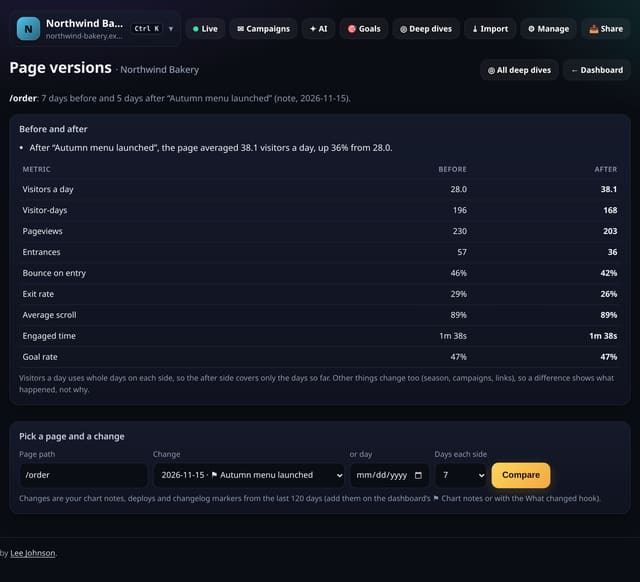
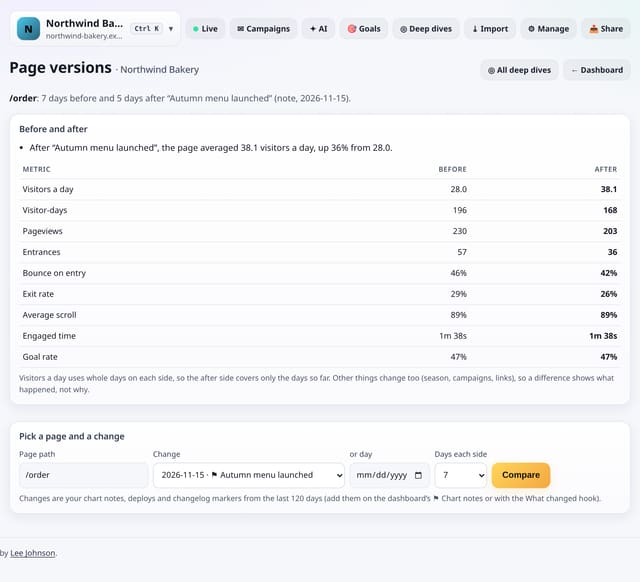
Page versions compares one page across a change: 7, 14 or 28 days before against the same number of days after (or the days so far). It shows visitors a day, visitor-days, pageviews, entrances, bounce on entry, exit rate, average scroll, engaged time and goal rate, with plain-English notes on what moved. Changes come from your chart notes, deploy markers and changelog markers, so a redesign you logged once can be checked any time.
Why it matters
Most page edits are never checked. A before-and-after on the numbers that matter tells you whether the new copy, layout or price helped, hurt or made no difference.
How to use it
- Log changes as you make them: a chart note, a deploy marker or a changelog marker.
- Tap ◎ Deep dives, then Page versions. Type the page path and pick the change, or a day.
- Choose 7, 14 or 28 days each side and tap Compare.
- Read the notes and the before/after table. A small sample is flagged.
How it works
- Log the change: add a chart note on the dashboard, or send deploys with the What changed hook.
- Open Deep dives, choose Page versions, type the page path and pick the change (or a day).
- Choose 7, 14 or 28 days each side and read the notes and the table. From a page deep dive, tap Before / after on any change.
Privacy
- Collected: Nothing new: pageviews, optional engagement data, goals and your change markers
- Not collected: Anything about a single visitor
- Not collected: Copies of your page
- No cookies, and nothing stored on the visitor’s device.
- Reports show totals only: never a visitor list, IP address or single visit.
Limits
- Compares numbers, not page content: quietstats never stores your pages
- A small sample (under 30 visitor-days a side) is flagged as a hint, not proof
- Up to 28 days each side; markers from the last 120 days are listed
- D1: one read of those days, cached for 10 minutes
Plans
Every plan, including Free. quietstats is free during launch: the Free plan covers 1 site and 5,000 pageviews a month, and no card is needed. See pricing.
Questions
Does this prove the change caused the difference?
No. Seasons, campaigns and links change too. It shows what happened around the change so you can judge.
What if the change was yesterday?
The after side covers the days so far and is labelled that way. Come back later for a fuller picture.
Can I compare without a marker?
Yes. Leave the change empty and pick a day.
Related
Feature page: Page versions: one page before and after a change → What it is, why it matters, privacy and how other tools do it.