How to use social networks compared: which network sends real readers
Visits from each social network side by side, with bounce rate, depth, engaged time and conversions.
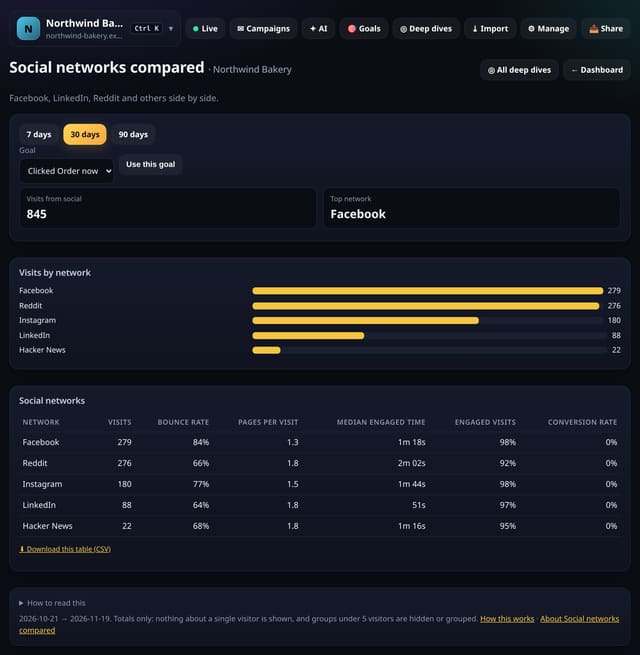
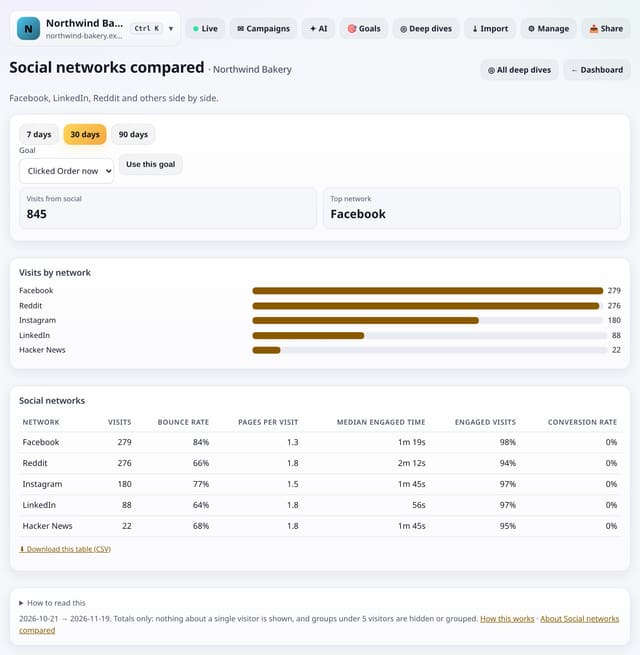
What it does
quietstats names each social referrer (Facebook, Instagram, X, LinkedIn, Reddit, YouTube, Pinterest, TikTok, Threads, Bluesky, Mastodon, Hacker News and others), adding app and web versions together, and compares networks with 5 or more visits.
Why it matters
A network that sends many visitors who leave at once may be worth less than a smaller one that sends readers.
How to use it
- Open Deep dives → Analysis lab → Social networks compared, or search “Social networks compared” on All reports (or go to /app/lab/socialnets?site=YOUR_SITE).
- Pick a goal at the top to add conversion rates.
- The default range is 30 days; pick another at the top.
- Download any table with its CSV link; small numbers show as “<5” there too.
How it works
- Open your dashboard, go to Deep dives (or Reports on a phone) and open Analysis lab.
- Under Sources and campaigns, tap Social networks compared. You can also search for it on the All reports screen.
- Pick a date range (and any options at the top), read the “How to read this” notes, and download any table as CSV.
Privacy
- Collected: Nothing new: it reads the pageviews, events, goals or daily totals you already have
- Not collected: Anything about a single visitor
- Not collected: Links between days: visitor ids still reset at midnight
- No cookies, and nothing stored on the visitor’s device.
- Reports show totals only: never a visitor list, IP address or single visit.
Limits
- Networks with fewer than 5 visits are left out
- Some apps send no referrer; tag links with utm_source
- Up to 92 days and 200,000 pageviews per screen
- Read from the database only when you open it, then kept for 10 minutes
Plans
Every plan, including Free. quietstats is free during launch: the Free plan covers 1 site and 5,000 pageviews a month, and no card is needed. See pricing.
Questions
Why is some social traffic in Direct?
Some apps open links without saying where they came from. Tag the links you post with utm_source to see them.
Does it store anything new?
No. It is worked out from the pageviews and events you already have when you open the screen, and only the totals are kept for 10 minutes.
Related
Feature page: Social networks compared: which network sends real readers → What it is, why it matters, privacy and how other tools do it.