Product performance: every product page from view to order
Shop dashboards tell you what sold.
See each product in your shop from first view to cart, checkout and order, with where its visitors came from, how far they read and the revenue that started on it.
Why quietstats: you get this without cookies, a consent banner or storing IP addresses, in every plan including Free.
In every plan, including Free. Goals, events and conversions.
📘 Step-by-step guide, with screenshots and diagrams →
Start free, no cardSee live demo
- No cookies or consent banner
- No IP addresses stored
- Groups under 5 visitors hidden
- 845-byte script
- Free plan, no card
What it is
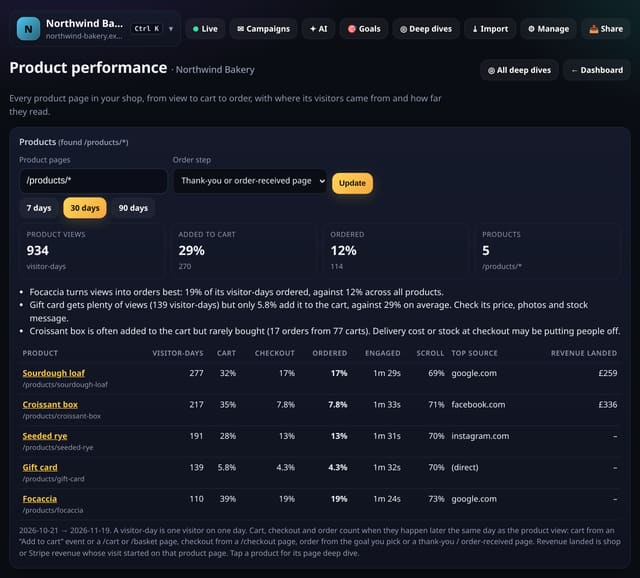
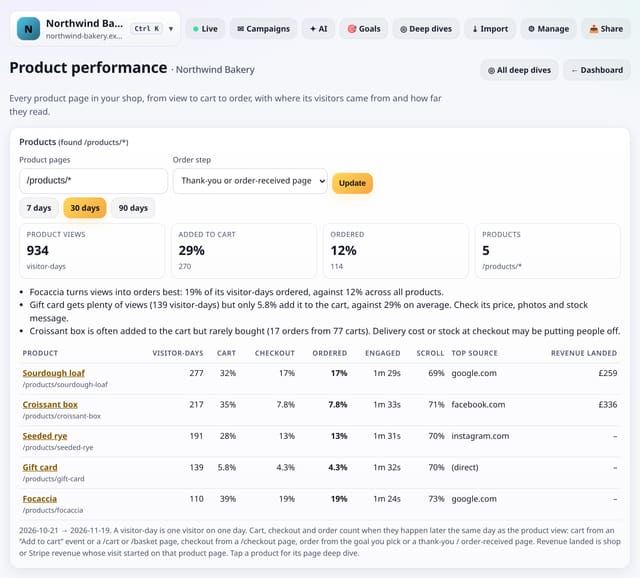
quietstats finds your product pages (/products/*, /product/*, /shop/* and similar, or a pattern you type) and lists each product with its visitor-days, add-to-cart rate, checkout rate and order rate, its top source, engaged time, scroll depth and any shop or Stripe revenue whose visit started on that page. Plain-English notes point out the best converter, a product that is viewed a lot but rarely added to the cart, and one that is often added but rarely bought.
Why it matters
Shop dashboards tell you what sold. This tells you which product pages are doing the selling and which ones lose people, using the visits you already count.
How it works
- Open Deep dives and choose Product performance. Product pages are found automatically; type a pattern if yours live elsewhere, such as /collections/bread/*.
- Pick how an order is spotted: a thank-you or order-received page, or one of your goals.
- For the cart step, send an “Add to cart” event with the events script, or let the /cart or /basket page count.
Privacy: what is and isn’t collected
Collected
- Nothing new: pageviews, custom events, goals and revenue totals you already collect
Never collected
- What anyone bought, their basket or their order
- Any customer detail from your shop
- Cookies, localStorage or anything else stored on the visitor’s device
- IP addresses or user agents (used in memory, then discarded)
- Anything that links a visitor across days (the visitor ID resets daily)
Rows and limits
- Steps count when they happen later the same day as the product view (visitor IDs last one day)
- Revenue is matched by the page the visit started on, so it shows only where shop or Stripe revenue tracking is set up
- Up to 50 products and the last 92 days at a time
- D1: one bounded read when you open it, cached for 10 minutes; nothing is written
“Rows” are database rows written, which is what our hosting is billed on. Reads are not rows written. Methodology →
Questions
Does it need a shop connection?
No. Views, cart and checkout steps come from pages and events quietstats already counts. Revenue appears if you also connect WooCommerce, Shopify or Stripe.
What is a visitor-day?
One visitor on one day. quietstats keeps no cookies, so the same person on another day counts again.
My shop uses different URLs. Will it work?
Yes: type the pattern your product pages share, with * at the end, and the screen uses it.
Related features
Goals, events and conversionsRevenue cards and revenue by source
Goals, events and conversionsGoals and funnels
Goals, events and conversionsAuto-tracking v2: email and phone links, middle-clicks and CSS-class events
Goals, events and conversionsA/B tests with your own tags and a plain-English confidence note
Goals, events and conversionsAttribution models: first touch, last touch, linear and position-based
Goals, events and conversionsPages that help conversions
Goals, events and conversionsPaths to goal: the pages people read before converting
Goals, events and conversions
All goals, events and conversions features → · All features → · Docs: Product performance guide → · Compare features with other tools →
Guides on this topic
Set it up
<!-- Optional: count add-to-cart clicks (events script) -->
<button onclick="qs('Add to cart')">Add to cart</button>
Replace YOUR_SITE_ID with the ID on your site’s settings page. Install guides →
Try it on your own site
Free during launch: one site and 5,000 pageviews a month, no card needed. After launch, paid plans start at £5 a month.