How to use Email and phone links, middle-clicks and CSS-class events
An optional add-on that counts clicks on email and phone links, links opened with a middle-click, and events named in a CSS class, for site builders that only let you add classes.
What it does
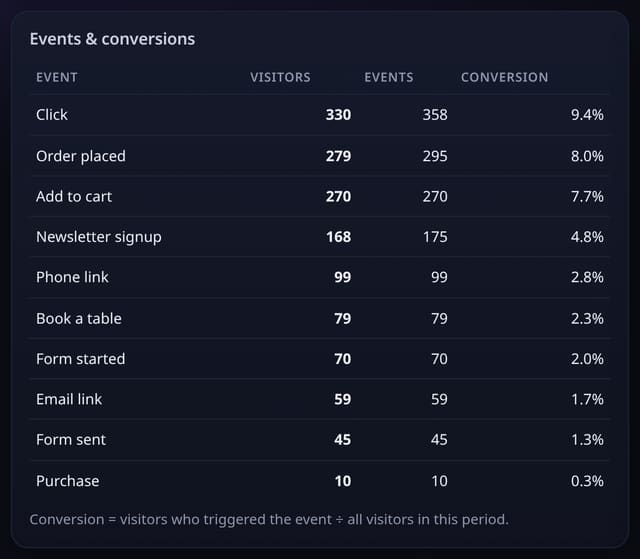
autolinks.js sits next to your quietstats tag or goes in the one-file bundle. A click on a mailto: link counts as Email link and a tel: link as Phone link, without the address or number. A middle-click (open in a new tab) on an outbound link or a file download counts as Outbound link or File download, the clicks the events script cannot see. Any element with a class such as qs-event-Signup counts Signup when clicked, with an optional qs-prop-Value class for a label.
Why it matters
For many small businesses an email or a phone call is the conversion. And WordPress blocks, Webflow and Squarespace often let you add a CSS class but not a data attribute, so class-based events make no-code tracking possible.
How to use it
- Add the autolinks.js tag after your quietstats tag, or tick Email and phone links in the one-file bundle.
- Email link and Phone link events appear on the Events card after the first clicks.
- For a button you can only style, add class qs-event-Name (+ for spaces) and optionally qs-prop-Label.
- Turn any of them into a goal on the Goals card.
How it works
- Add the autolinks.js tag after your quietstats tag, or tick it in Manage site → One-file bundle.
- Email and phone link clicks start counting straight away.
- For a button, add the class qs-event-Name (use + for spaces, such as qs-event-Book+a+table) and optionally qs-prop-Label.
- Make goals from Email link, Phone link or your own names on the Goals card.
Privacy
- Collected: Event name (Email link, Phone link, Outbound link, File download or your class name) and the page it happened on
- Collected: Outbound host or download path for middle-clicks, and your optional qs-prop label
- Not collected: The email address or phone number
- Not collected: Anything typed
- Not collected: Cookies or anything stored in the browser
- No cookies, and nothing stored on the visitor’s device.
- Reports show totals only: never a visitor list, IP address or single visit.
Limits
- Elements that already have data-qs-event are left to the events script, so nothing counts twice
- Ordinary left-clicks on outbound links and downloads are counted by the events script with data-auto, not by this add-on
- autolinks.js is about 1.5 KB; script.js is unchanged at 845 bytes
- D1: 1 row per counted click, as for any custom event
Plans
Every plan, including Free. quietstats is free during launch: the Free plan covers 1 site and 5,000 pageviews a month, and no card is needed. See pricing.
Questions
Do I need the events script too?
No. autolinks.js sends its own events. Add events.js as well if you also want data-qs-event, goals from code or left-click outbound tracking.
Is the email address stored?
No. Only the words Email link or Phone link and the page are sent.
Why middle-clicks?
People often open links in a new tab with the middle button. Browsers do not report those as normal clicks, so they were missed before.
Set it up
Show the install snippet
<script data-host="https://quietstats.co.uk" data-site="YOUR_SITE_ID" data-dnt="true" src="https://quietstats.co.uk/js/autolinks.js" async defer></script>
<a class="wp-block-button__link qs-event-Book+a+table" href="/book">Book a table</a>
Replace YOUR_SITE_ID with the ID shown on your site’s Manage page.
Related
Feature page: Auto-tracking v2: email and phone links, middle-clicks and CSS-class events → What it is, why it matters, privacy and how other tools do it.