Source lookup: everything one source sent you
When a new referrer appears, the first question is “what did they look at?”.
Type one site or utm_source and see its visitors, change, landing pages, countries, devices and conversions.
Why quietstats: you get this without cookies, a consent banner or storing IP addresses, in every plan including Free.
In every plan, including Free. Sources and campaigns.
📘 Step-by-step guide, with screenshots and diagrams →
Start free, no cardSee live demo
- No cookies or consent banner
- No IP addresses stored
- Groups under 5 visitors hidden
- 845-byte script
- Free plan, no card
What it is
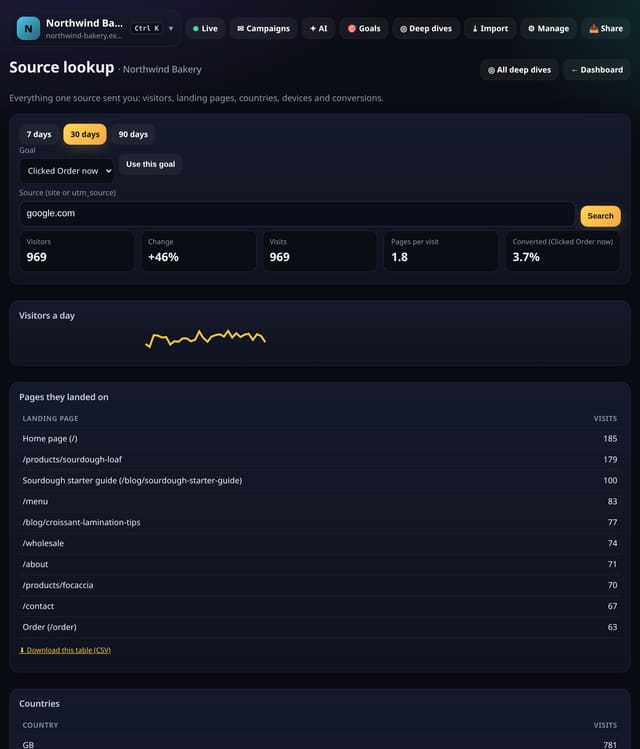
Enter a source such as linkedin.com. The lookup shows visitors and change, visits, pages per visit, a daily line, where those visits landed, their countries and devices and, with a goal, how many converted.
Why it matters
When a new referrer appears, the first question is “what did they look at?”. This answers it on one screen.
How it works
- Open your dashboard and choose Toolkit in the menu (or the Toolkit button on Deep dives, or search for it on All reports).
- Under Find and check, tap Source lookup.
- Use the options at the top; nothing is saved unless you press a save button.
Privacy: what is and isn’t collected
Collected
- Nothing new from your visitors
Never collected
- Anything about a single visitor
- Links between days: visitor ids still reset at midnight
- Cookies, localStorage or anything else stored on the visitor’s device
- IP addresses or user agents (used in memory, then discarded)
- Anything that links a visitor across days (the visitor ID resets daily)
Rows and limits
- Sources under 5 visitors show nothing
- Groups under 5 visits are left out
- Up to 92 days and 200,000 pageviews per screen
- Read from the database only when you open it, then kept for 10 minutes
“Rows” are database rows written, which is what our hosting is billed on. Reads are not rows written. Methodology →
Questions
Does it collect anything new?
No. It works from the pageviews, events and goals you already have, read when you open the screen and kept as totals for 10 minutes. Groups under 5 visitors are never shown exactly.
Related features
Sources and campaignsSource watchlist: keep an eye on the sites that send you visitors
Sources and campaignsSource scorecards: which traffic is worth the most
Sources and campaignsCampaign link tester: check tagged links before they go out
Sources and campaignsCampaign planner: plan campaigns, then track them against the plan
Sources and campaignsSource leaderboard: climbers, fallers and new entries
Sources and campaignsCampaign watchlist: your live campaigns in one list
Sources and campaignsShop orders by source: WooCommerce and Shopify
Goals, events and conversions
All sources and campaigns features → · All features → · Docs: Source lookup guide → · Compare features with other tools →
Guides on this topic
Set it up
Nothing to set up: it works with the standard one-line script.
<script data-host="https://quietstats.co.uk" data-dnt="true" src="https://quietstats.co.uk/js/script.js" id="YOUR_SITE_ID" async defer></script>Try it on your own site
Free during launch: one site and 5,000 pageviews a month, no card needed. After launch, paid plans start at £5 a month.