How to use bounce rate movers: pages whose bounce rate really changed
Landing pages whose bounce rate rose or fell against the period before by more than chance would explain.
What it does
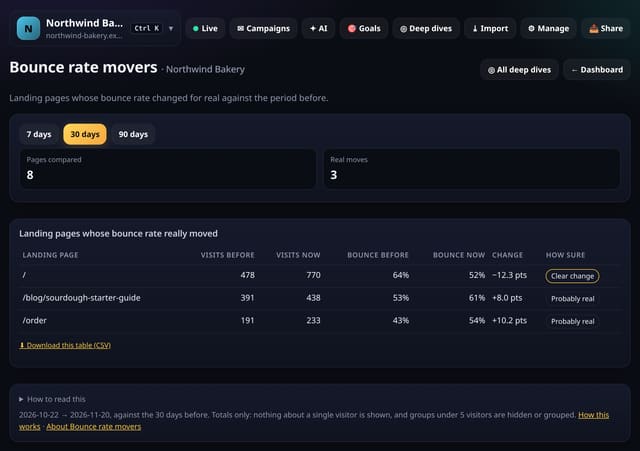
quietstats compares each landing page’s bounce rate with the period of the same length just before your range. Only pages with 20 or more visits in both periods are tested, and only changes with a two-proportion test of 2 or more are listed.
Why it matters
A jump in bounce rate often follows a page edit, a slow image or a change in where visitors come from. This shows the real moves and skips the noise.
How to use it
- Open Deep dives → Analysis lab → Bounce rate movers, or search “Bounce rate movers” on All reports (or go to /app/lab/bouncemovers?site=YOUR_SITE).
- The default range is 30 days; pick another at the top.
- Download any table with its CSV link; small numbers show as “<5” there too.
How it works
- Open your dashboard, go to Deep dives (or Reports on a phone) and open Analysis lab.
- Under Content, tap Bounce rate movers. You can also search for it on the All reports screen.
- Pick a date range (and any options at the top), read the “How to read this” notes, and download any table as CSV.
Privacy
- Collected: Nothing new: it reads the pageviews, events, goals or daily totals you already have
- Not collected: Anything about a single visitor
- Not collected: Links between days: visitor ids still reset at midnight
- No cookies, and nothing stored on the visitor’s device.
- Reports show totals only: never a visitor list, IP address or single visit.
Limits
- Needs data from the period before your range
- Pages need 20 or more visits in both periods
- Up to 92 days and 200,000 pageviews per screen
- Read from the database only when you open it, then kept for 10 minutes
Plans
Every plan, including Free. quietstats is free during launch: the Free plan covers 1 site and 5,000 pageviews a month, and no card is needed. See pricing.
Questions
Why are some pages missing?
Pages with too few visits, or changes that could be chance, are left out on purpose.
Does it store anything new?
No. It is worked out from the pageviews and events you already have when you open the screen, and only the totals are kept for 10 minutes.
Related
Feature page: Bounce rate movers: pages whose bounce rate really changed → What it is, why it matters, privacy and how other tools do it.