How to use growth rate: moving averages and month-by-month growth
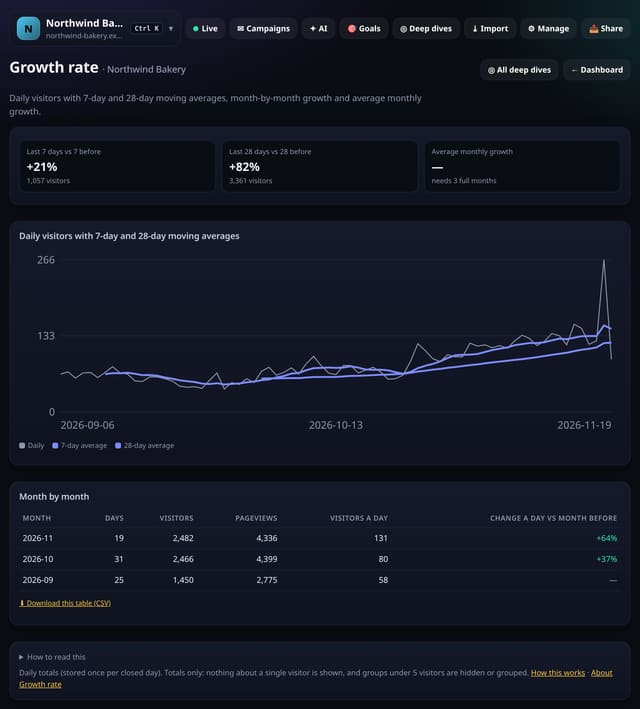
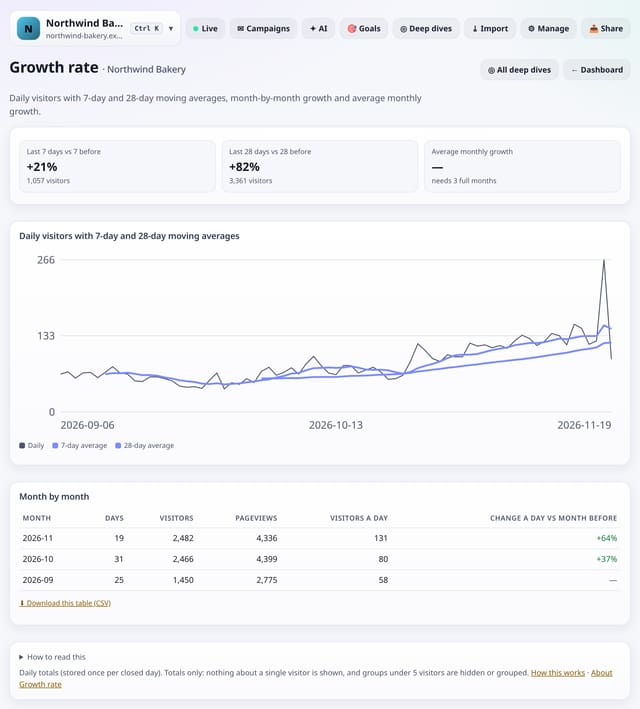
Daily visitors with 7-day and 28-day moving averages, the last 7 and 28 days against the period before, a month-by-month table and your average monthly growth.
What it does
quietstats charts up to 400 days of daily visitors with 7-day and 28-day moving averages so the direction shows through weekday ups and downs. Cards compare the last 7 and 28 finished days with the days before, and once there are 3 full months it shows the average monthly growth rate. The month table lists visitors, pageviews, visitors a day and the change on the month before.
Why it matters
Day-to-day numbers are noisy. Moving averages and a monthly growth rate are what owners and clients actually want to know: are we growing, and how fast?
How to use it
- Open Deep dives → Analysis lab → Growth rate (or go to /app/lab/growth?site=YOUR_SITE).
- Choose 7, 30 or 90 days; long-range trends read best at 90.
- Download any table with its CSV link; small numbers show as “<5” there too.
How it works
- Open your dashboard, go to Deep dives and scroll to Analysis lab.
- Under Traffic over time, tap Growth rate.
- Pick 7, 30 or 90 days (and any options at the top), read the “How to read this” notes, and download any table as CSV.
Privacy
- Collected: Nothing new: it reads the pageviews (and goals, events or speed checks) you already have
- Not collected: Anything about a single visitor
- Not collected: Links between days: visitor ids still reset at midnight
- No cookies, and nothing stored on the visitor’s device.
- Reports show totals only: never a visitor list, IP address or single visit.
Limits
- Average monthly growth needs 3 full months (25+ days each)
- Daily totals are stored once per finished day (lab_daily) and include imported history
- Up to 92 days and 200,000 pageviews per screen
- Read from the database only when you open it, then kept for 10 minutes
Plans
Every plan, including Free. quietstats is free during launch: the Free plan covers 1 site and 5,000 pageviews a month, and no card is needed. See pricing.
Questions
Why does the 28-day line start later?
A 28-day average needs 28 days of data first.
Is imported history included?
Yes, for days before your live data starts.
Related
Feature page: Growth rate: moving averages and month-by-month growth → What it is, why it matters, privacy and how other tools do it.