Glossary and dashboard tooltips
Analytics has its own jargon, and cookie-free counting uses some words differently.
Hover the small question mark on any headline number to see what it means; click it for the full glossary of analytics words in plain English.
Why quietstats: you get this without cookies, a consent banner or storing IP addresses, in every plan including Free.
In every plan, including Free. See your traffic.
📘 Step-by-step guide, with screenshots and diagrams →
Start free, no cardSee live demo
- No cookies or consent banner
- No IP addresses stored
- Groups under 5 visitors hidden
- 845-byte script
- Free plan, no card
What it is
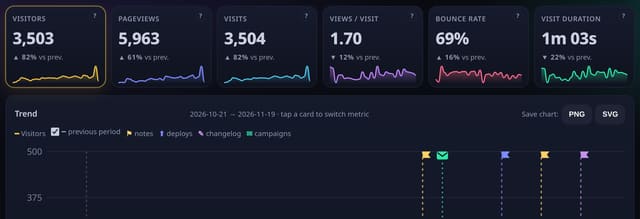
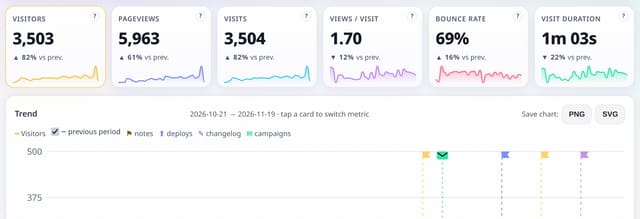
Each of the six headline numbers on the dashboard (visitors, pageviews, visits, views per visit, bounce rate and visit duration) has a small question mark. Hover or focus it for a one-line definition; click it to open that term in the glossary at /glossary, which defines 30 analytics words from A/B test to visitor, each with a link to more detail.
Why it matters
Analytics has its own jargon, and cookie-free counting uses some words differently. A definition one click away stops misreadings before they become decisions.
How it works
- Hover or tab to the ? on a headline number for its definition.
- Click it to open the glossary in a new tab, right at that term.
- Follow “More” to the handbook or feature page.
Privacy: what is and isn’t collected
Collected
- Nothing new
Never collected
- Which tooltips anyone opens
- Cookies, localStorage or anything else stored on the visitor’s device
- IP addresses or user agents (used in memory, then discarded)
- Anything that links a visitor across days (the visitor ID resets daily)
Rows and limits
- Tooltips are on the six headline numbers; other cards link to their feature pages
“Rows” are database rows written, which is what our hosting is billed on. Reads are not rows written. Methodology →
Questions
Do the question marks appear on shared dashboards?
Yes, on the public demo and shared stats pages too, so anyone you share with can look up a word.
Can I link to one term?
Yes, for example /glossary#bounce-rate.
Related features
See your trafficBounce rate, visit duration and same-day returns
See your trafficTrend charts, headline cards and any date range
See your trafficGrowth rate: moving averages and month-by-month growth
See your trafficSeasonality: your weekday and month patterns
See your trafficPlaces: regions and optional city totals, with small places hidden
See your trafficMilestones on your dashboard
Reports, sharing and alertsCalendar heatmap: every day of the last year
See your traffic
All see your traffic features → · All features → · Docs: Glossary and dashboard tooltips guide → · Compare features with other tools →
Guides on this topic
Set it up
Nothing to set up: it works with the standard one-line script.
<script data-host="https://quietstats.co.uk" data-dnt="true" src="https://quietstats.co.uk/js/script.js" id="YOUR_SITE_ID" async defer></script>Try it on your own site
Free during launch: one site and 5,000 pageviews a month, no card needed. After launch, paid plans start at £5 a month.