How to use milestones
A small card that notices the good moments: your best day yet, first visitors from a new country, pageview milestones and how long you have been counting.
What it does
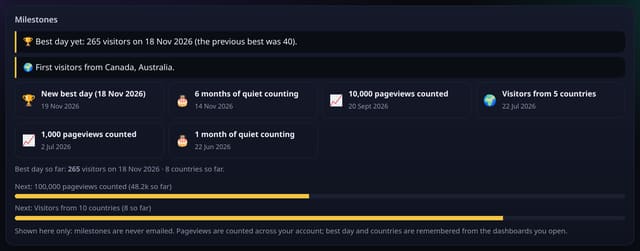
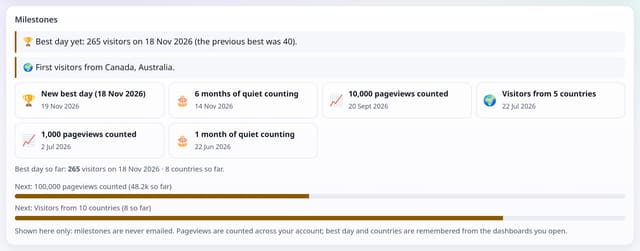
The Milestones card on the dashboard remembers your best day and the countries seen so far, and marks milestones as they happen: 1,000, 10,000, 100,000 and 1,000,000 pageviews counted, visitors from 5, 10, 25, 50 and 100 countries, and 1, 6, 12 and 24 months of counting. A new best day or a new country gets a highlight, and progress bars show the next milestone.
Why it matters
Small sites grow slowly. Seeing that you just had your best day ever, or your first visitor from Japan, is a reason to keep going.
How to use it
- Open your dashboard. The Milestones card sits under This week in plain English.
- Earned milestones show with the day they happened; highlights call out a new best day or new countries.
- Progress bars show how close the next pageview and country milestones are.
- Nothing is emailed; hide the card with a custom dashboard if you like.
How it works
- Open your dashboard: the card appears under This week in plain English.
- Milestones are checked against the numbers the dashboard already loaded for the dates you are viewing.
- Hide the card with a custom dashboard if you prefer.
Privacy
- Collected: Nothing new: one row per site with your best day, countries seen so far and when each milestone was earned
- Not collected: Anything about a single visitor
- No cookies, and nothing stored on the visitor’s device.
- Reports show totals only: never a visitor list, IP address or single visit.
Limits
- Shown on the dashboard only: milestones are never emailed or posted
- Best day and countries are remembered from the dashboards you open, so a day is noticed when its dates are on screen
- Pageviews are counted across your account
- D1: 2 small reads per dashboard view; 1 row written only when something changes
Plans
Every plan, including Free. quietstats is free during launch: the Free plan covers 1 site and 5,000 pageviews a month, and no card is needed. See pricing.
Questions
Will I get an email when I hit a milestone?
No. Milestones are shown on your dashboard only.
Why didn’t my best day show straight away?
The first time you open the dashboard, quietstats quietly sets your record. After that, a new best day is highlighted when you open a range that includes it.
Related
Feature page: Milestones on your dashboard → What it is, why it matters, privacy and how other tools do it.