How to use custom dashboards
Drag the cards you check most to the top, hide the ones you never read, and keep several named dashboards per site, such as a Monday check, a content view and a conversions view.
What it does
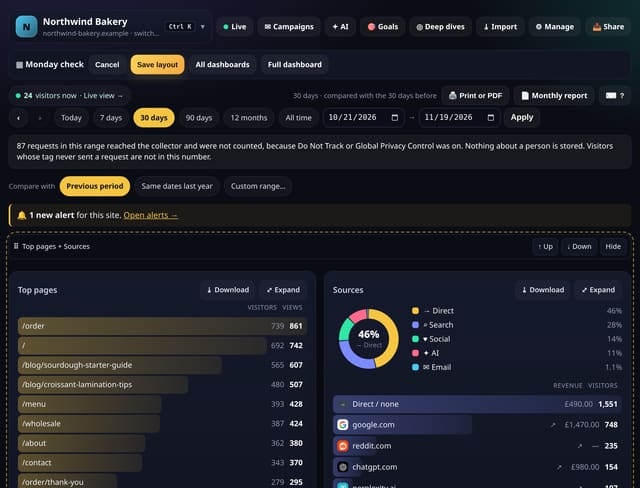
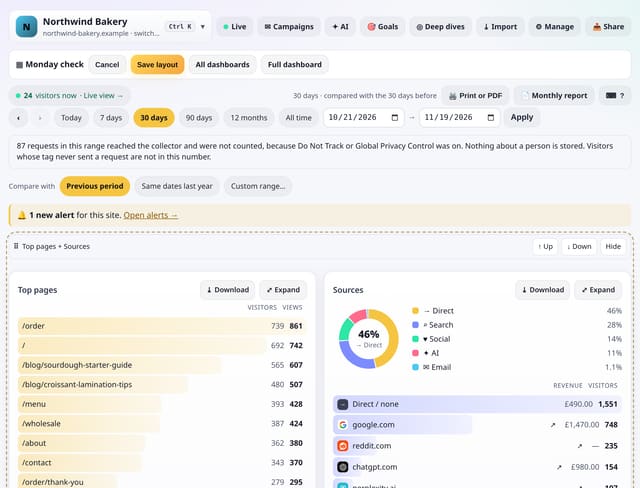
A custom dashboard is a saved layout of your normal dashboard: which cards show and in what order. Create one from scratch or from a starter (Traffic overview, Content, Conversions), then tap Edit layout and drag cards by their ⠿ handle, or use the ↑ Up and ↓ Down buttons on a phone. Hide a card with one tap and bring it back the same way. Every site can have up to 10, and the full dashboard is always one tap away.
Why it matters
Most people look at the same five cards every day. Putting them first, and the rest out of the way, turns a long dashboard into a quick check, and a separate view for each job keeps the right numbers in front of the right person.
How to use it
- Tap ◎ Deep dives in the site bar, then Custom dashboards.
- Name a new dashboard, pick a starter (every card, Traffic overview, Content or Conversions) and tap Create and arrange.
- Drag cards by the ⠿ handle, or use ↑ Up and ↓ Down. Tap Hide on cards you do not need.
- Tap Save layout. Rename or delete dashboards from the list; the full dashboard never changes.
How it works
- Open Deep dives from the site bar and choose Custom dashboards, or go to /app/dashboards.
- Create a dashboard and pick a starter. It opens in edit mode with a handle, ↑, ↓ and Hide on every card.
- Arrange the cards and tap Save layout. Open it again any time from the list, or bookmark its link.
Privacy
- Collected: Nothing new: a layout is a list of card names and an order
- Not collected: Anything about your visitors
- Not collected: Which cards you look at
- No cookies, and nothing stored on the visitor’s device.
- Reports show totals only: never a visitor list, IP address or single visit.
Limits
- Up to 10 dashboards per site
- A layout changes what is shown, not the numbers: every card uses the same date range and filters as the full dashboard
- New cards that arrive later appear at the end of a custom dashboard until you place them
- D1: 1 small read to open a custom dashboard, 1 row written when you save; the full dashboard is unchanged
Plans
Every plan, including Free. quietstats is free during launch: the Free plan covers 1 site and 5,000 pageviews a month, and no card is needed. See pricing.
Questions
Does a custom dashboard change my data?
No. It only changes which cards show and their order. Deleting a dashboard deletes the layout, never your stats.
Can I drag on an iPhone?
Use the ↑ Up and ↓ Down buttons on each card in edit mode. They work everywhere, including with a keyboard and screen readers.
Is my full dashboard still there?
Yes. Full dashboard is a link on every custom dashboard, and nothing about it changes.
Related
Feature page: Custom dashboards: your cards, your order, several per site → What it is, why it matters, privacy and how other tools do it.