How to use page deep dive
Open any page to see its visitors over time, how people arrived, where they went next, how far they scrolled, how fast it was, which goals it helped, how often AI crawlers read it, whether it is fading and what changed.
What it does
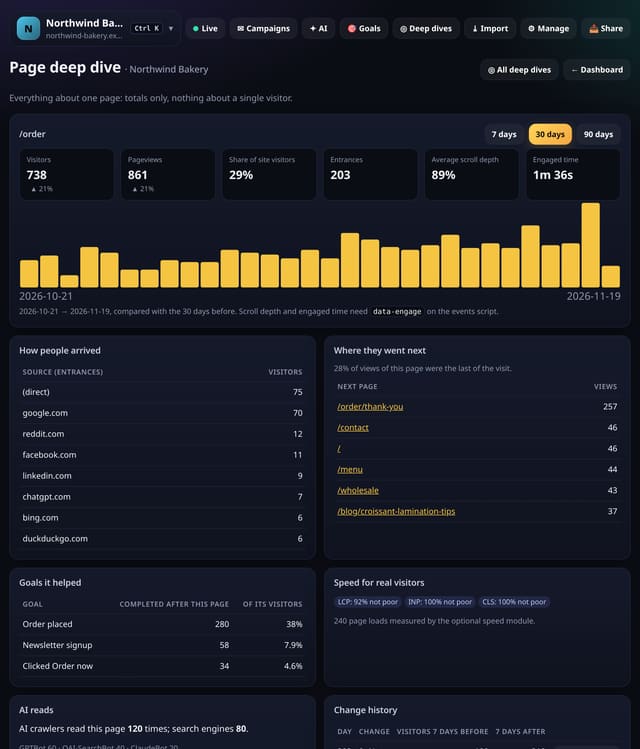
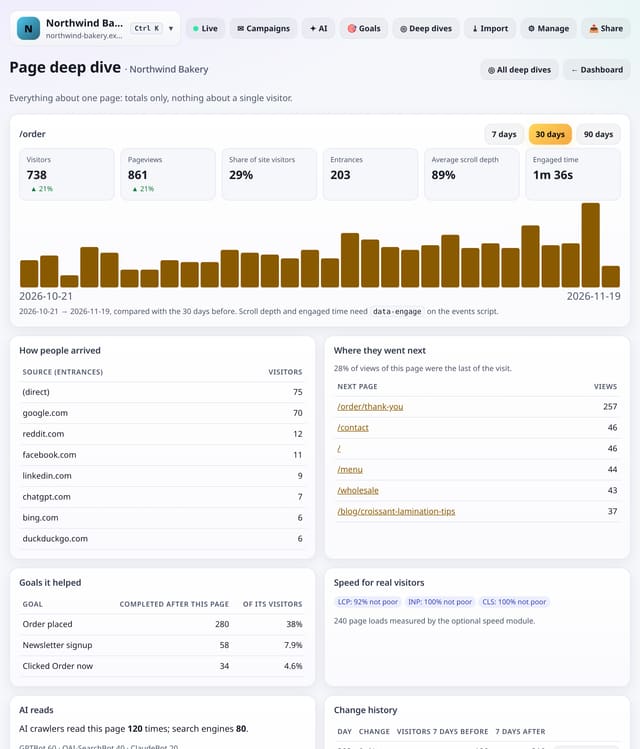
The page deep dive gathers every number quietstats has about one page: visitors and pageviews with the change on the period before and a daily chart, share of all site visitors, entrances and their sources, the next pages people opened (and how often the visit ended there), average scroll depth and engaged time, real-visitor Core Web Vitals, goals completed after viewing it, AI crawler and search engine reads, a decay warning when visitors fall by 40% or more, and the chart notes, deploys and changelog markers in the range with visitors 7 days before and after each one.
Why it matters
Deciding what to do with a page means checking six cards and three screens. One screen per page makes the answer obvious: keep it, fix it, refresh it or link to it more.
How to use it
- Tap ◎ Deep dives, then Page deep dive. Pick a page from your most viewed ones, or type its path such as /pricing.
- From the dashboard: tap a page in Top pages to filter to it, then tap ◉ Deep dive this page.
- Read the totals and chart first, then arrivals, next pages, goals helped, speed, AI reads and change history.
- Tap Before / after on a change to compare the page around that date.
How it works
- Open Deep dives and choose Page deep dive, then pick one of your most viewed pages or type a path.
- Or filter the dashboard to one page (tap it in Top pages) and tap ◉ Deep dive this page.
- Switch between 7, 30 and 90 days. Tap a next page to open its own deep dive, or Before / after on a change to compare the page around it.
Privacy
- Collected: Nothing new: pageviews, optional scroll and speed data, goals, crawler totals and chart notes you already have
- Not collected: Anything about a single visitor
- Not collected: Visitor paths stored anywhere
- No cookies, and nothing stored on the visitor’s device.
- Reports show totals only: never a visitor list, IP address or single visit.
Limits
- Up to 92 days; very busy ranges use the first 200,000 pageviews
- Scroll depth and engaged time need data-engage; speed needs the optional speed module
- Goals helped counts visitor-days that viewed the page and then completed the goal the same day
- D1: one read of the range and the range before, plus small reads of events, speed, crawler and note totals; cached for 10 minutes
Plans
Every plan, including Free. quietstats is free during launch: the Free plan covers 1 site and 5,000 pageviews a month, and no card is needed. See pricing.
Questions
Is “goals it helped” the same as attribution?
No. It counts visitors who saw this page and then completed the goal later the same day. Several pages can share the credit.
What triggers the decay warning?
At least 10 visitors in the period before and a fall of 40% or more this period, the same rule as the story card.
Why do AI reads show nothing?
Crawler reads are counted when crawler reporting is set up for the site. Search and AI crawlers that never reach quietstats are not seen.
Related
Feature page: Page deep dive: everything about one page on one screen → What it is, why it matters, privacy and how other tools do it.