How to use import from Google Analytics, Plausible or Fathom
Bring your history across from Google Analytics 4, Plausible or Fathom with a CSV export. Free on every plan, no sign-in to the old tool, and you see exactly what will be added first.
What it does
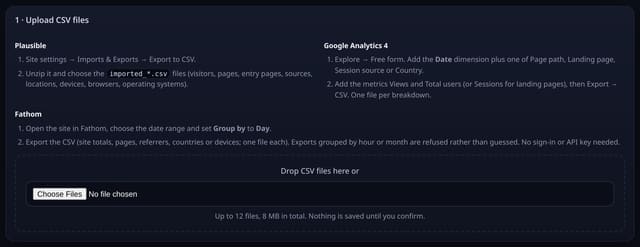
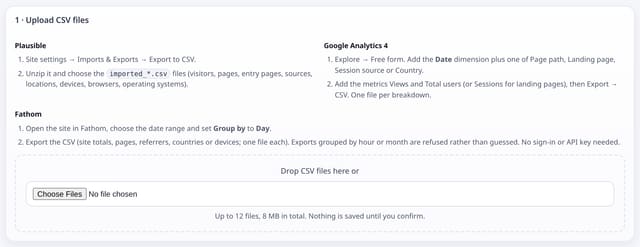
Upload the CSV files you export from GA4, Plausible or Fathom. quietstats works out which tool they came from, turns them into daily totals per page, source, country and device, and shows a preview with the number of rows before anything is saved. Imported days are marked imported on your dashboard and only fill the days before your first live visit, so nothing is counted twice. Undo removes an import in one step.
Why it matters
Switching tools should not mean starting from zero. Your year-on-year charts and top pages keep working from day one.
How to use it
- Open Import on your dashboard, or go to /app/import for the site.
- Fathom: open the site, choose the date range, set Group by to Day and export the CSV (site totals, pages, referrers, countries or devices, one file each). GA4: Explore → Free form with the Date dimension, then Export → CSV. Plausible: Imports & Exports → Export to CSV.
- Drop the files in. Check the preview, including rows to add and the import capacity left today, then tap Import.
- Changed your mind? Undo import removes every row from that import. Live data is never touched.
How it works
- Open Import on your dashboard (/app/import).
- Export from your old tool: GA4 Explore → Free form with the Date dimension; Plausible Imports & Exports → Export to CSV; Fathom with Group by set to Day.
- Drop the files in. Check the preview (days, pageviews, visitors and rows to add), then Import.
- Fathom exports grouped by hour or month are refused rather than guessed. Plausible can also be pulled with a Stats API key that is used once and never stored.
Privacy
- Collected: Daily totals per page, source, country, device, browser and OS from your export
- Not collected: Any per-visitor row (exports are aggregated before saving)
- Not collected: Your Google, Plausible or Fathom password or sign-in (no OAuth)
- Not collected: The Plausible API key (used once, never stored)
- No cookies, and nothing stored on the visitor’s device.
- Reports show totals only: never a visitor list, IP address or single visit.
Limits
- CSV only for GA4 and Fathom (no sign-in to them)
- 20,000 rows per import and 8 MB of files
- A shared daily import allowance keeps the service inside its database limits; if it is used up, try again after midnight UTC
- Top 50 values per day per breakdown; the rest are summed as (other)
- Fathom does not publish its exact CSV column names; if a file is not recognised the page says what it needs
Plans
Every plan, including Free. quietstats is free during launch: the Free plan covers 1 site and 5,000 pageviews a month, and no card is needed. See pricing.
Questions
Is importing really free?
Yes, on every plan including the free one.
Will imported and live numbers be counted twice?
No. Imported days only show for dates before your first live quietstats visit.
Why was my Fathom file refused?
It was grouped by hour or month. Export it again with Group by set to Day, so every row is one day.
Related
Feature page: Free import from Google Analytics, Plausible and Fathom → What it is, why it matters, privacy and how other tools do it.
Guides on this topic
- Import Plausible Analytics history: CSV, API and validation
- Import GA4 history into another analytics tool: what moves
- Squarespace Analytics vs Google Analytics: why the numbers differ
- Can analytics identify traffic from Google AI Overviews?
- How to find AI traffic in GA4, including the AI Assistant channel