Custom dashboards: your cards, your order, several per site
Most people look at the same five cards every day.
Drag the cards you check most to the top, hide the ones you never read, and keep several named dashboards per site, such as a Monday check, a content view and a conversions view.
Why quietstats: you get this without cookies, a consent banner or storing IP addresses, in every plan including Free.
In every plan, including Free. See your traffic.
📘 Step-by-step guide, with screenshots and diagrams →
Start free, no cardSee live demo
- No cookies or consent banner
- No IP addresses stored
- Groups under 5 visitors hidden
- 845-byte script
- Free plan, no card
What it is
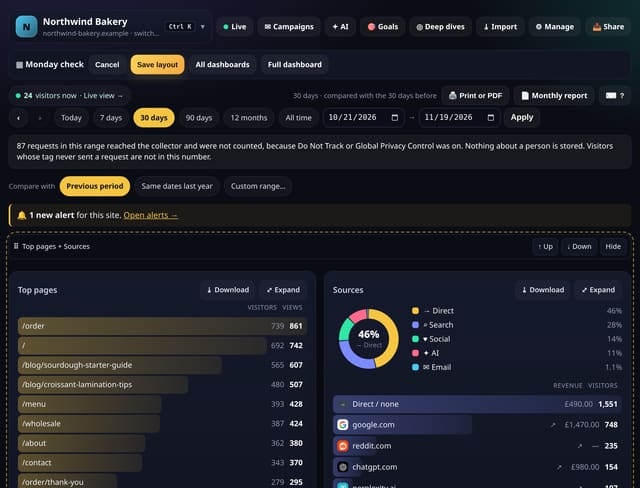
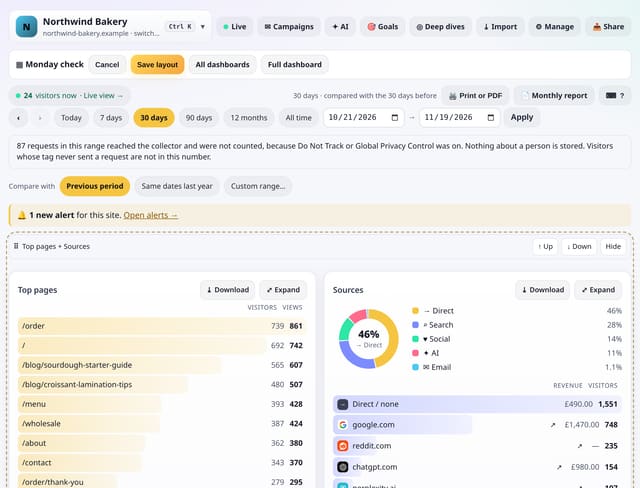
A custom dashboard is a saved layout of your normal dashboard: which cards show and in what order. Create one from scratch or from a starter (Traffic overview, Content, Conversions), then tap Edit layout and drag cards by their ⠿ handle, or use the ↑ Up and ↓ Down buttons on a phone. Hide a card with one tap and bring it back the same way. Every site can have up to 10, and the full dashboard is always one tap away.
Why it matters
Most people look at the same five cards every day. Putting them first, and the rest out of the way, turns a long dashboard into a quick check, and a separate view for each job keeps the right numbers in front of the right person.
How it works
- Open Deep dives from the site bar and choose Custom dashboards, or go to /app/dashboards.
- Create a dashboard and pick a starter. It opens in edit mode with a handle, ↑, ↓ and Hide on every card.
- Arrange the cards and tap Save layout. Open it again any time from the list, or bookmark its link.
Privacy: what is and isn’t collected
Collected
- Nothing new: a layout is a list of card names and an order
Never collected
- Anything about your visitors
- Which cards you look at
- Cookies, localStorage or anything else stored on the visitor’s device
- IP addresses or user agents (used in memory, then discarded)
- Anything that links a visitor across days (the visitor ID resets daily)
Rows and limits
- Up to 10 dashboards per site
- A layout changes what is shown, not the numbers: every card uses the same date range and filters as the full dashboard
- New cards that arrive later appear at the end of a custom dashboard until you place them
- D1: 1 small read to open a custom dashboard, 1 row written when you save; the full dashboard is unchanged
“Rows” are database rows written, which is what our hosting is billed on. Reads are not rows written. Methodology →
Questions
Does a custom dashboard change my data?
No. It only changes which cards show and their order. Deleting a dashboard deletes the layout, never your stats.
Can I drag on an iPhone?
Use the ↑ Up and ↓ Down buttons on each card in edit mode. They work everywhere, including with a keyboard and screen readers.
Is my full dashboard still there?
Yes. Full dashboard is a link on every custom dashboard, and nothing about it changes.
Related features
Data in and outA better mobile dashboard
See your trafficDisplay preferences: dark mode, reduced motion and data saving
See your trafficCompare two segments side by side
See your trafficSite health: uptime, speed and Core Web Vitals in one card
See your trafficPlaces: regions and optional city totals, with small places hidden
See your trafficToday view for your iPhone home screen
See your trafficCustom metrics: build your own ratios from numbers you have
Goals, events and conversions
All see your traffic features → · All features → · Docs: Custom dashboards guide → · Compare features with other tools →
Guides on this topic
Set it up
Nothing to set up: it works with the standard one-line script.
<script data-host="https://quietstats.co.uk" data-dnt="true" src="https://quietstats.co.uk/js/script.js" id="YOUR_SITE_ID" async defer></script>Try it on your own site
Free during launch: one site and 5,000 pageviews a month, no card needed. After launch, paid plans start at £5 a month.