How to use a/B tests with manual tags
Compare two versions of a page, an email link or a message on any goal, and get a plain-English note on whether the difference is real or could be chance.
What it does
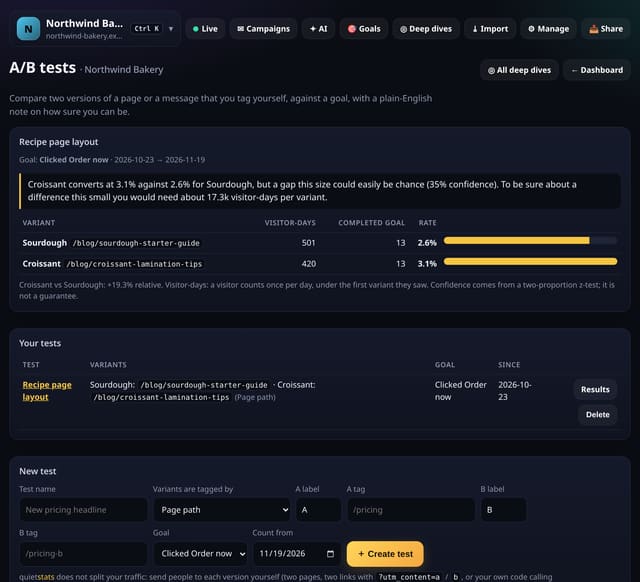
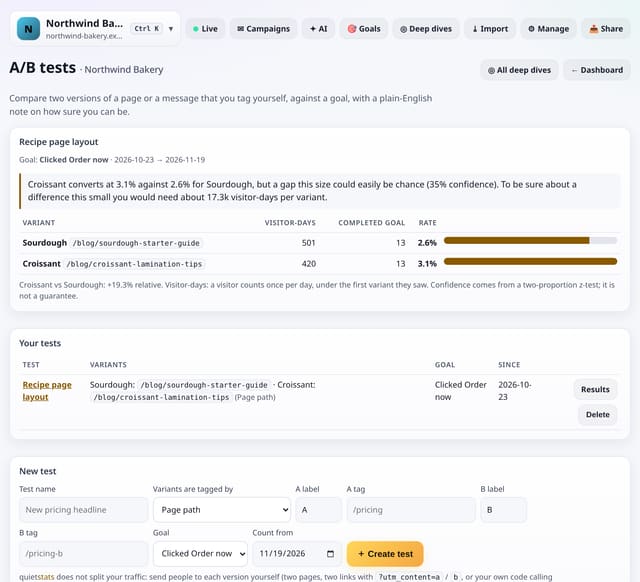
You run the two versions and tag them yourself: two page paths (/pricing and /pricing-b), two utm_content values on your links, or a Variant event from your own code with the events script. For the goal you pick, quietstats counts the visitor-days that saw each variant (the first one seen wins) and how many completed the goal later that day, shows each conversion rate and the relative lift, and runs a two-proportion z-test. The note says whether one version is probably better, only suggestive, or too close to call, and roughly how many visitor-days you would need to be sure.
Why it matters
Most A/B tools add a heavy script, cookies and a consent banner. If you can publish two versions, quietstats can tell you which one works, with no extra script and nothing stored about anyone.
How to use it
- Make sure the goal exists on the Goals card.
- Tap ◎ Deep dives, then A/B tests. Name the test and choose how variants are tagged: page path, utm_content value or Variant event.
- Enter the tag for A and B, pick the goal and the first day to count, then tap Create test.
- Open the test any time. Read the note first: probably better, suggestive or too close to call.
How it works
- Set up the goal you care about (a page, event, click or form goal).
- Publish two versions and tag them: two paths, ?utm_content=a and ?utm_content=b on your links, or qs('Variant', 'B') in your code.
- Open Deep dives, choose A/B tests, create the test with both tags and the goal, then open its results.
Privacy
- Collected: Nothing new: pageviews, utm_content, custom events and goals you already collect
- Collected: One row per test: its name, tags, goal and start day
- Not collected: Which visitor saw which version
- Not collected: Cookies or anything stored in the browser to keep a visitor on one version
- No cookies, and nothing stored on the visitor’s device.
- Reports show totals only: never a visitor list, IP address or single visit.
Limits
- quietstats does not split traffic: you choose who sees each version
- Visitors are counted per day (daily visitor IDs), so a person who returns on another day counts again
- Up to 10 tests per site; results use up to the last 92 days
- D1: results read the days since the test started when you open it, cached for 10 minutes; creating a test writes 1 row
Plans
Every plan, including Free. quietstats is free during launch: the Free plan covers 1 site and 5,000 pageviews a month, and no card is needed. See pricing.
Questions
How sure is “probably better”?
At least 95% confidence from a two-proportion z-test. Between 80% and 95% the note says the lead is suggestive, not conclusive.
Why “visitor-days”?
quietstats keeps no cookies, so a visitor ID lasts one day. Someone who comes back tomorrow is counted again, under whichever version they see first.
Can I test emails?
Yes: give the links in each email version a different utm_content and compare them on a goal.
Set it up
Show the install snippet
<!-- Variant event (events script) on the page that shows version B -->
<script>qs('Variant', 'B')</script>
Replace YOUR_SITE_ID with the ID shown on your site’s Manage page.
Related
Feature page: A/B tests with your own tags and a plain-English confidence note → What it is, why it matters, privacy and how other tools do it.